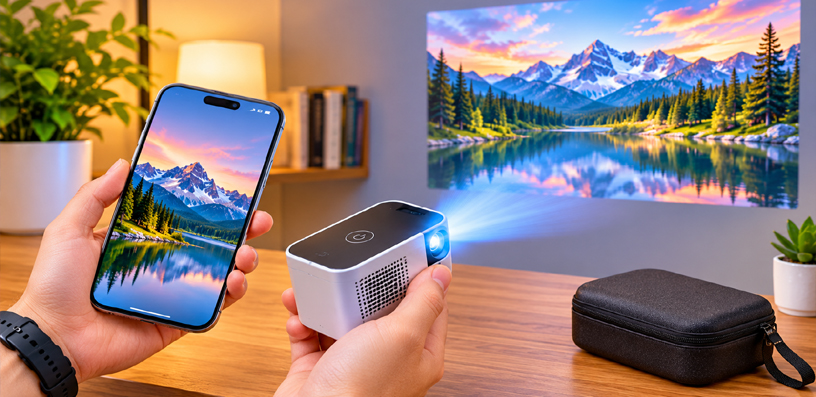
Best Pocket Projector for iPhone Users 2026 – Top 5 Reviews
The best pocket projector for iPhone users turns the phone in your pocket into a big screen without the television, a laptop, or a bag full of cables. You open a video on your iPhone, send it to a projector the size of a sandwich, and watch it on a wall, a ceiling, or a bedsheet. That is the whole idea, and when it works, it feels like a small piece of everyday magic.
Your iPhone Already Holds the Cinema
But not every pocket projector treats an iPhone equally. Some connect to an iPhone in seconds over AirPlay. Some need a wired adapter.
Some only mirror through their own wireless system, and some cannot mirror an iPhone screen at all without help. The differences matter more than brightness or resolution, because a projector you cannot connect easily is a projector you will stop using.
This guide ranks five pocket projectors for iPhone-first use. That means the ranking puts iPhone connection ease first, true pocket size second, and everything else after that.
A projector can be excellent in general and still rank lower here if it makes an iPhone owner work harder. Each pick carries its honest trade-off, because every pocket projector has one.
How We Ranked the Best Pocket Projector for iPhone Users 2026
Five tests decided the order. First, iPhone connection: does it support AirPlay or easy peer-to-peer mirroring from an iPhone, and does it offer a wired fallback?
Second, true pocket size and weight: can it genuinely fit in a jacket pocket or a small bag? Third, battery life for on-the-go viewing, since a pocket projector that must stay plugged in is only half portable.
Fourth, instant setup: autofocus, keystone correction, and a stand or shape that aims the picture without a tripod. Fifth, picture quality in a dark room, where pocket projectors actually get used.
One rule runs through the whole list. iPhones do not support Miracast, and Bluetooth carries audio only, never video. Any projector that promises iPhone video over Miracast or Bluetooth is promising something the phone cannot do.
The honest iPhone routes are AirPlay over shared Wi-Fi, peer-to-peer AirPlay or the projector’s own wireless mirroring where supported, app casting from supported apps, and a wired USB-C or Lightning adapter.
You will see exactly which route each pick below uses, so there are no surprises after unboxing.
Best Pocket Projector for iPhone Users 2026: Quick Comparison
| Rank | Projector | iPhone Connection | Brightness | Battery | Weight | Buy |
|---|---|---|---|---|---|---|
| 1 | KODAK Luma 150 Mini Projector | AirPlay + HDMI | 60 ANSI lumens | Up to 2.5 hours | 7.75 oz | Buy from Amazon |
| 2 | ViewSonic M1MINIPLUS-S | Wi-Fi mirroring + HDMI | 120 LED lumens | Up to 1.5 hours | 0.3 kg | Buy from Amazon |
| 3 | Aurzen ZIP Tri-Fold DLP | Peer-to-peer mirroring | 100 ANSI lumens | Up to 1.5 hours | 280 g | Buy from Amazon |
| 4 | XuanPad 4K Support Movie Projector | Wireless mirroring + HDMI | Maker-claimed, varies | Mains power | 1.89 lb | Buy from Amazon |
| 5 | NEBULA Capsule 3 Portable Projector | App casting + HDMI | 200 ANSI lumens | Up to 2.5 hours | 0.85 kg | Buy from Amazon |
1. KODAK Luma 150 — Best Overall for iPhone Users
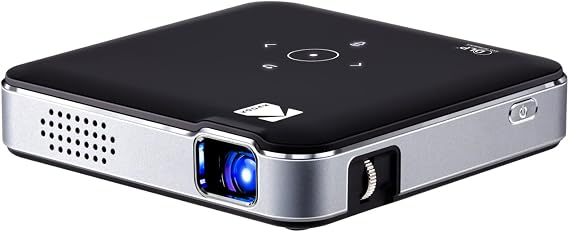 The Luma 150 takes the top spot for one simple reason: it is the smallest projector here, and it speaks the iPhone’s own wireless language. At under eight ounces, it disappears into a jacket pocket.
Its built-in AirPlay support means an iPhone can send video to it over shared Wi-Fi without extra apps or dongles. For an iPhone owner who wants the shortest path from phone to wall, nothing else on this list is as direct.
That small size comes with honest limits. The picture is 480p native, so fine text and detailed scenes will not look as sharp as the 1080p picks below. Brightness is modest, which means this is a dark-room projector: curtains closed, lights low, screen size kept sensible.
Within that contract, it is a genuinely enjoyable little cinema, and the magnetic lens cover that doubles as a kickstand is a thoughtful touch for aiming the picture from a table or a bedside surface.
Setup is refreshingly simple. Connect the iPhone over AirPlay on the same Wi-Fi network, or plug in over HDMI with the right adapter for your iPhone model. The built-in speaker handles a quiet room, and a tripod mount on the bottom gives a stable option when a table is not at the right height.
For travel, sleepovers, dorm rooms, and spontaneous movie nights, the Luma 150 is the pocket projector most likely to actually come along, because it is the one you forget you are carrying.
There is another reason the Luma 150 suits iPhone owners so well: it asks nothing of the phone beyond what the phone already does. There is no companion app to install, no account to create, and no fiddly pairing ritual.
You join the same Wi-Fi network, open Control Center, and send the picture. That simplicity matters most in the moments pocket projectors are made for, when friends are waiting, and nobody wants to troubleshoot.
The microSD slot and USB input add a second life for downloaded videos and photo slideshows, so the projector keeps working even when the phone stays in a pocket.
For an iPhone owner who values the shortest distance between an idea and a big picture, this is the pick that gets out of the way.
- Resolution: 854 x 480 native, 1080p input supported
- Brightness: 60 ANSI lumens
- Contrast: 1000:1
- Screen size: Up to 150 inches
- Speaker: 1.5W built-in
- Battery: Up to 2.5 hours
- Weight: 7.75 oz
- Size: 3.9 x 3.9 x 0.89 inches
- Connections: AirPlay wireless, HDMI, USB, microSD, tripod mount
✓ Pros
- Smallest and lightest projector on this list
- Native AirPlay support for iPhones
- Battery covers a full film in a dark room
- Simple setup with a useful kickstand lens cover
✗ Cons
- 480p native resolution, not sharp for fine detail
- Modest brightness needs a dark room
- Small speaker suits quiet rooms only
- Manual focus takes a moment to dial in
When NOT to choose: Do not pick the Luma 150 if you mainly watch in a lit room or need crisp text for presentations, since its brightness and resolution are built for dark-room films, not daylight slides.
2. ViewSonic M1MINIPLUS-S — Best Pocket Design and Stand
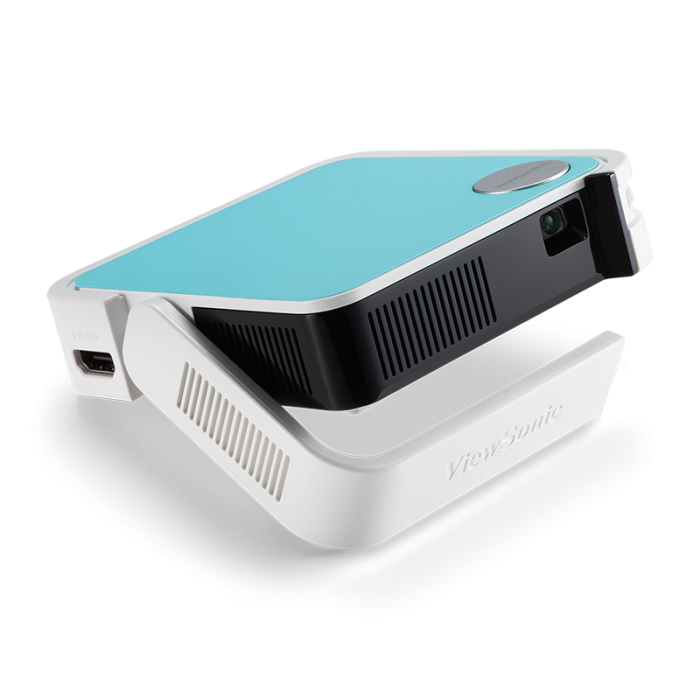 The M1 Mini Plus is the pocket projector with the cleverest body. Its smart stand folds out to aim the picture and folds back to cover the lens, so there is no separate tripod to carry and no lens cap to lose.
At about two-thirds of a pound, it is still genuinely pocketable, and the swappable coloured panels are a small but pleasant touch for a device that lives in a bag.
For iPhone owners, connection runs over the projector’s Wi-Fi screen mirroring or over a wired HDMI adapter.
It does not offer native AirPlay, which is why it sits below the Luma 150 in this ranking, but mirroring over its own Wi-Fi system works well once you have paired the phone, and the wired route stays available for apps that refuse to mirror.
The built-in speaker is a single 2W unit, fine for a bedroom or a small group, and the projector can also act as a Bluetooth speaker for music when the picture is off.
The trade-offs are familiar at this size. Native resolution is 480p, so this is not the pick for sharp text, and the battery runs about an hour and a half, which covers most films but not a double feature without a power bank.
The 8GB of onboard storage is handy for loading videos directly, and automatic vertical keystone keeps the picture rectangular without menu diving. For an iPhone owner who values a self-contained, stand-and-go design over raw sharpness, the M1 Mini Plus is a thoughtful second place.
The onboard storage deserves a special mention for iPhone owners. Load a few films or a photo slideshow onto the projector itself, and the phone becomes optional for the evening, which is handy when battery anxiety strikes or when children are the audience.
The projector’s smart system also runs its own apps, so a quick cartoon session does not need the phone at all. Where the M1 Mini Plus earns its keep is in bedrooms, classrooms, and small offices, where the stand aims the picture in seconds, and the automatic keystone keeps it straight. It is not the brightest or sharpest projector here, but it is one of the easiest to live with day to day.
- Resolution: 854 x 480 native, 1080p input supported
- Brightness: 120 LED lumens
- Light source: LED, up to 30,000 hours
- Screen size: 24 to 100 inches
- Speaker: 2W built-in, Bluetooth speaker mode
- Battery: Up to 1.5 hours, power-bank compatible
- Weight: 0.3 kg
- Size: 110 x 104 x 27 mm
- Connections: Wi-Fi screen mirroring, HDMI 1.4, USB-C power, USB-A, 8GB storage
✓ Pros
- Smart stand aims the picture and protects the lens
- Genuinely pocketable at 0.3 kg
- Automatic vertical keystone correction
- Works as a Bluetooth speaker when not projecting
✗ Cons
- No native AirPlay for iPhones
- 480p native resolution limits fine detail
- Battery covers about one film, not two
- Small speaker needs help in larger rooms
When NOT to choose: Do not pick the M1 Mini Plus if native AirPlay is a must-have, or if you need a full evening of battery-only viewing without a power bank nearby.
3. Aurzen ZIP Tri-Fold DLP — Best for Instant iPhone Mirroring
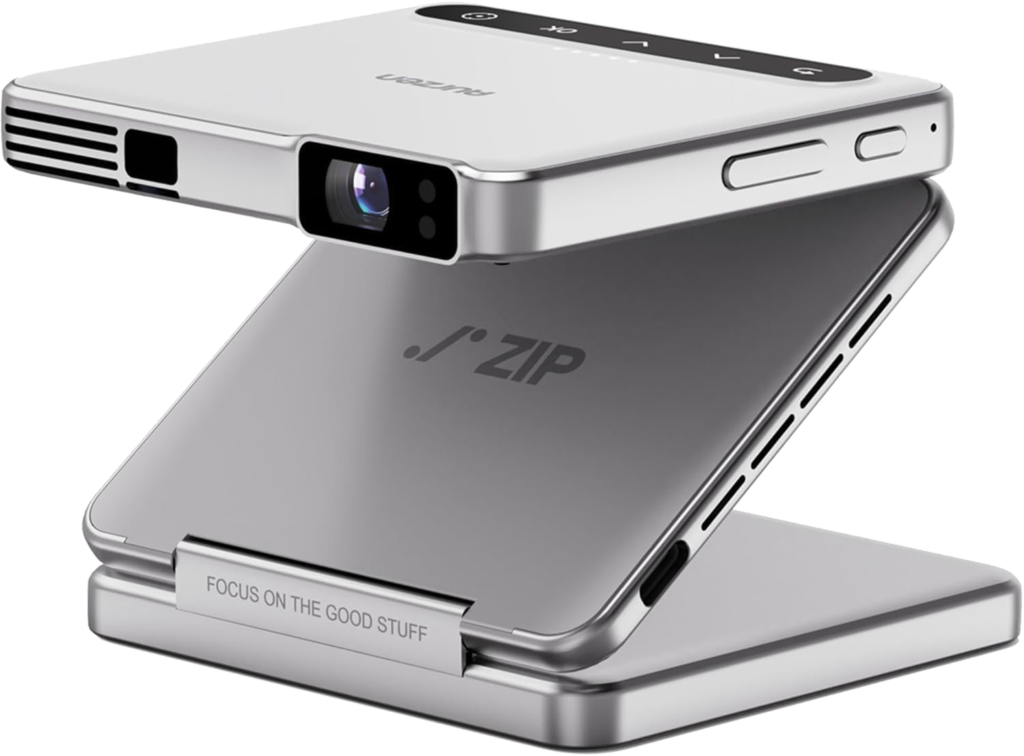 The ZIP is the most inventive projector on this list. It folds into a Z shape about the size of a wallet, unfolds into a projector with its own built-in stand, and mirrors an iPhone without needing a Wi-Fi network at all.
Its peer-to-peer mirroring means you can walk into a friend’s living room, a classroom, or a campsite and put your phone screen on the wall in seconds, with no router password and no setup ritual.
That instant mirroring is the ZIP’s superpower for iPhone users, and its vertical full-screen mode is a genuinely new trick: rotate the picture and phone-style vertical video fills the screen instead of sitting in a letterboxed strip.
The autofocus and keystone correction work continuously, measuring distance many times per second, so the picture stays sharp even if the little projector gets nudged. For sharing photos, social video, drawing tutorials, and casual films, the experience feels closer to an accessory than an appliance.
The honest limits are brightness and battery. At 100 ANSI lumens with a 720p native picture, this is a dark-room device, and the battery runs about an hour and a half. There is also one caveat iPhone owners must know: the standard ZIP has no wired video input, and DRM-protected streaming apps may not mirror directly.
For those apps, the maker’s optional CastPlay dongle, sold separately, is the workaround. If your viewing is mostly your own photos, videos, and social content, the ZIP is delightful. If it is mostly subscription streaming apps, read that caveat twice.
Where the ZIP quietly shines is in sharing. A phone full of holiday photos becomes a living-room slideshow in seconds, and the vertical mode means portrait video from a phone finally fills the screen instead of floating in a small box.
Artists and crafters use it to trace projected images onto paper, teachers use it for quick classroom demos, and parents use it for bedtime stories thrown large onto a bedroom wall. The folding body also means it survives bags and backpacks better than rigid pocket projectors, since the lens and optics fold away inside the shape.
For an iPhone owner whose phone is a camera roll first and a cinema second, the ZIP matches how the phone is actually used.
- Resolution: 720p native, 1080p input supported
- Brightness: 100 ANSI lumens
- Contrast: 300:1
- Throw ratio: 1.09:1
- Screen size: 25 to 125 inches
- Speakers: Dual built-in speakers, Bluetooth 5.4 audio output
- Battery: 5000mAh, up to 1.5 hours, USB-C PD charging
- Weight: About 280 g
- Connections: Peer-to-peer wireless mirroring from iOS, no Wi-Fi network needed, vertical full-screen mode
✓ Pros
- Peer-to-peer iPhone mirroring with no Wi-Fi needed
- Folds to wallet size with a built-in stand
- Vertical full-screen mode for phone video
- Continuous autofocus and keystone correction
✗ Cons
- No wired video input on this model
- DRM streaming apps may need the optional CastPlay dongle
- Battery covers about one film
- 720p and modest brightness need a dark room
When NOT to choose: Do not pick the ZIP as your main streaming-apps projector unless you are happy to add the CastPlay dongle, since protected apps may not mirror directly.
4. XuanPad 4K Support Movie Projector — Best Big-Screen Value
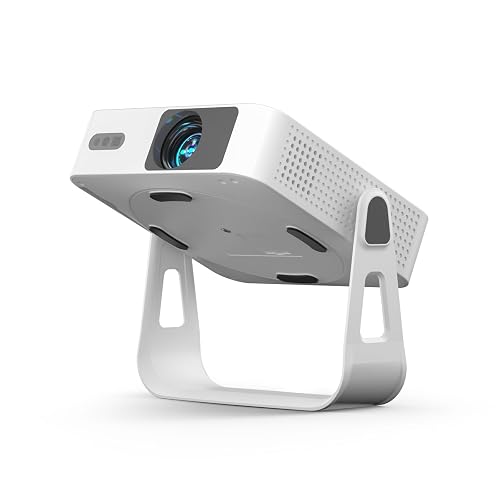 The XuanPad is the odd one out in this ranking, and deliberately so. It is bigger and heavier than the true pocket picks, and it runs on mains power rather than a battery.
What it offers in return is a native 1080p picture with 4K input support, a rotatable stand that aims at walls or ceilings, and a built-in smart system with streaming apps, all in a unit roughly the size of a small tablet.
For an iPhone owner who wants the biggest, sharpest picture on this list and does not mind a power cable, it is the value pick.
iPhone connection runs over wireless screen mirroring or a wired HDMI adapter, and the built-in apps mean you can also leave the phone out of it entirely for streaming nights.
Autofocus and multi-axis keystone correction handle setup quickly, and the 360-degree stand is genuinely useful in a bedroom, where ceiling projection turns a late film into a lie-down cinema. The picture holds up better in dim rooms than the smaller picks, which makes it the most forgiving choice when the lights cannot go fully out.
The trade-off is portability, stated plainly. At about 1.89 lb with no battery stated, this is a carry-in-a-bag projector, not a jacket-pocket one. Brightness claims for this maker’s models also vary between listings, so treat headline lumen figures with the usual caution and judge by the native 1080p picture in a dim room, which is where it earns its place.
If your priority is a true pocket device for the road, the three picks above fit better. If it is the best picture per size at home, the XuanPad makes its case.
The rotatable stand is what turns the XuanPad from a decent budget projector into a genuinely pleasant bedroom device. Aim it at the ceiling from a bedside table, and a late film becomes a lie-down cinema without a mount or a tripod.
The built-in smart apps also change the daily routine: on nights when the phone is charging or busy, the projector runs the evening itself, and the iPhone rejoins only when you want to share something from it.
Families tend to like this pick for a second room or a children’s room, where the larger, sharper picture matters more than pocketability, and a power outlet is always nearby.
- Resolution: 1920 x 1080 native, 4K input supported
- Brightness: Maker-claimed figures vary between listings; check the current listing
- Display: LCD with high-precision lens
- Screen size: Up to 200 inches (maker-stated)
- Speaker: Built-in speaker, Bluetooth 5.2 audio output
- Power: Mains-powered; no battery stated
- Weight: About 1.89 lb
- Connections: Wireless screen mirroring, HDMI, USB, Wi-Fi 6, built-in smart apps, 360-degree rotatable stand
✓ Pros
- Native 1080p picture, sharpest on this list
- Rotatable stand for wall and ceiling projection
- Built-in smart apps for phone-free streaming
- Autofocus and multi-axis keystone correction
✗ Cons
- No battery stated; needs mains power
- Heaviest pick here, not a jacket-pocket device
- Brightness claims vary between listings
- Budget-brand support and documentation are thinner
When NOT to choose: Do not pick the XuanPad if you need battery-powered, true pocket portability, since this one trades pocket size for picture size and needs a power outlet.
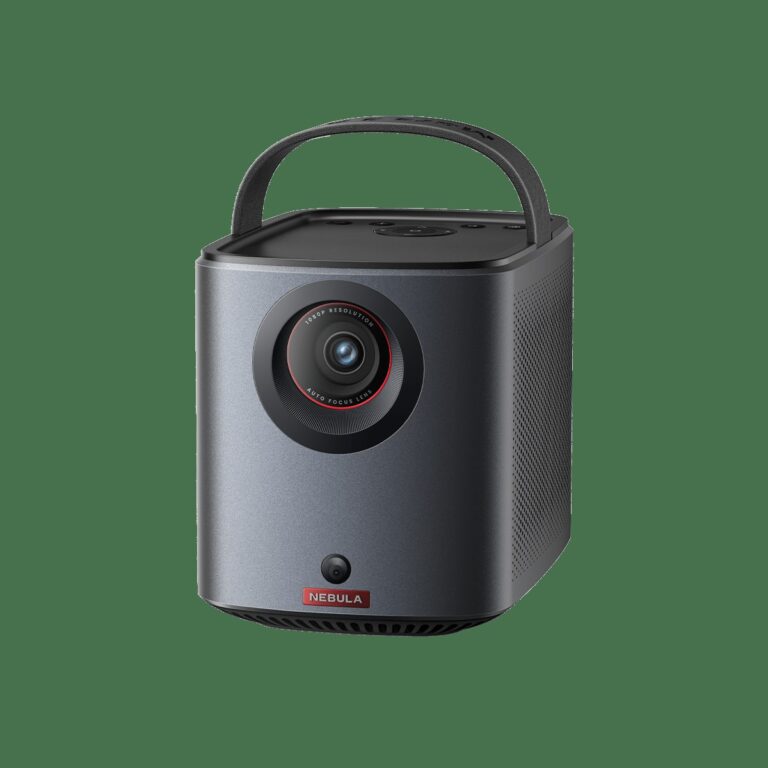
5. NEBULA Capsule 3 Portable Projector — Best Smart Projector Overall
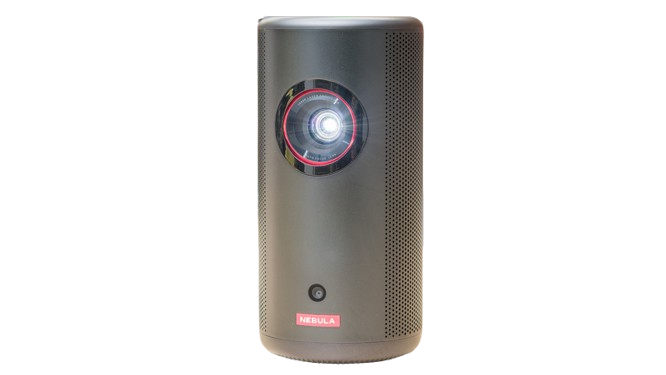 The Capsule 3 is the best projector on this list in general, and it ranks fifth here for one specific reason: it is the least iPhone-native.
Shaped as a soda can, it packs a true 1080p picture, a 2.5-hour battery, an 8W speaker, and a full smart TV system with licensed streaming apps into a genuinely portable body. As a standalone cinema, it beats everything above it. As an iPhone accessory, it asks for one extra step.
That step is the connection. The Capsule 3 does not offer native AirPlay. iPhone owners connect by casting from Chromecast-enabled apps, which covers many streaming services directly, or by using a wired HDMI adapter for full-screen mirroring.
Once connected, the experience is excellent: autofocus and keystone correction sort the picture, the smart system means the phone can stay in your pocket for streaming nights, and the battery covers a full film with room to spare. The projector can also double as a Bluetooth speaker, though remember that Bluetooth carries audio only, never video.
So why rank it fifth? Because this list ranks iPhone ease first. If your priority is the best picture and the most complete smart projector that still fits in a bag, the Capsule 3 is arguably the pick to buy, and its iPhone workaround is a small one.
But if your priority is the fastest, most native iPhone connection in the smallest body, the Luma 150 and the ZIP get there with less friction. Buy the Capsule 3 for the cinema; buy the picks above it for the phone.
There is one more reason the Capsule 3 deserves a long look despite its fifth-place ranking here. Its smart system and speaker make it the only pick on this list that can carry a whole evening without the phone at all, from streaming apps to music in speaker mode.
Many owners end up using it as a bedroom cinema first and an iPhone accessory second, which is a perfectly good outcome. The iPhone connection is a solved problem with a cable or a cast, not a missing feature.
Rank it by what you will do most: if the phone leads, the picks above win; if the cinema leads, the Capsule 3 is hard to beat at this size.
- Resolution: 1920 x 1080 native
- Brightness: 200 ANSI lumens
- Light source: LED, 30,000 hours
- Screen size: 40 to 120 inches
- Speaker: 8W built-in, Bluetooth speaker mode
- Battery: Up to 2.5 hours of video, USB-C PD charging
- Weight: 0.85 kg
- Size: 78 x 78 x 160 mm
- Connections: Chromecast app casting, HDMI 2.1, USB-C, Wi-Fi, smart TV system with licensed apps, autofocus and keystone
✓ Pros
- Best overall picture and sound on this list
- Full smart TV system with licensed streaming apps
- Battery covers a full film
- Soda-can size with autofocus and keystone
✗ Cons
- No native AirPlay for iPhones
- Heavier than the true pocket picks
- Full mirroring needs a wired adapter
- Needs a dark or dim room for its best picture
When NOT to choose: Do not pick the Capsule 3 if native AirPlay mirroring is a deal-breaker, since its iPhone route runs through app casting or a wired adapter instead.
How to Connect an iPhone to a Pocket Projector
Most connection problems come from expecting the wrong method. Start with what your iPhone can actually do. Open Control Center, tap Screen Mirroring, and look for the projector: if it supports AirPlay or its own peer-to-peer mirroring, it appears there.
If it does not appear, the projector likely needs its own wireless system, an app cast, or a cable. Guessing wastes an evening; checking the projector’s stated connection method takes a minute.
The wired route is the most reliable fallback for every projector on this list. USB-C iPhones connect with a USB-C to HDMI adapter or cable, and Lightning iPhones connect with a Lightning Digital AV Adapter.
Wired connections also sidestep most DRM trouble, since protected apps are far more likely to play over a cable than over a mirror. Keep the adapter in the same bag as the projector, and the pocket cinema stays pocket-sized in practice, not just in theory.
Choosing between wireless and wired comes down to what you are watching. For your own photos, home videos, and most casual content, wireless mirroring is fast and good enough. For subscription streaming apps, go wired first or use the projector’s built-in licensed apps, since those two routes dodge nearly all DRM trouble.
And for presentations or anything with fine text, wired wins again, because the picture stays steadier and sharper than a compressed wireless stream. A good rule is simple: wireless for sharing, wired for watching properly.
Two warnings save frustration. First, Bluetooth is audio only: pairing an iPhone to a projector over Bluetooth will play sound, never picture, no matter what a listing implies. Second, DRM-protected apps can show a black screen over some wireless mirroring connections, because the content protection handshake fails.
When that happens, switch to the projector’s built-in licensed apps or to a wired connection. For a deeper walkthrough, see our guide on how to connect an iPhone to a mini projector wirelessly, and for sound, our guide on connecting speakers to a projector. For power on the go, see how to power a projector outdoors without an outlet.
Frequently Asked Questions
Can I mirror my iPhone to any pocket projector?
Not to every one. Check whether the projector supports AirPlay, its own peer-to-peer mirroring, or app casting. If it supports none of those, a wired HDMI adapter is the reliable route.
Does an iPhone support Miracast?
No. iPhones do not support Miracast. Use AirPlay, the projector’s own wireless mirroring, app casting, or a wired adapter instead.
Why does Netflix show a black screen when I mirror?
DRM-protected apps can block wireless mirroring when the content protection handshake fails. Switch to the projector’s built-in licensed apps or to a wired HDMI connection.
Can Bluetooth send iPhone video to a projector?
No. Bluetooth carries audio only. Video needs AirPlay, wireless mirroring, app casting, or a wired connection.
Which cable do I need for a wired iPhone connection?
USB-C iPhones use a USB-C to HDMI adapter or cable. Lightning iPhones use a Lightning Digital AV Adapter. Both plug into the projector’s HDMI input.
Can a pocket projector work without Wi-Fi?
Yes, in two ways. Some projectors mirror peer-to-peer with no network at all, and every projector on this list works over a wired HDMI connection without Wi-Fi.
Is a pocket projector bright enough for a bedroom?
In a dark or dim bedroom, yes. Pocket projectors are built for dark rooms, so keep the lights low and the screen size sensible for the best picture.
Bottom Line
For most iPhone owners, the KODAK Luma 150 is the pick: the smallest body on this list with native AirPlay, a battery that covers a film, and a size you will actually carry. If you want the cleverest design, the ViewSonic M1 Mini Plus adds a self-contained stand. If you want instant mirroring with no Wi-Fi at all, the Aurzen ZIP folds into a wallet and mirrors in seconds.
If you want the sharpest big picture at home and accept a power cable, the XuanPad delivers native 1080p. And if you want the best all-round smart projector and accept casting or a cable for your iPhone, the NEBULA Capsule 3 is the strongest cinema here.
Whichever you choose, match the projector to your connection habit first and your brightness wish second. The fastest iPhone route wins more movie nights than the brightest spec sheet, because the projector that connects in seconds is the one that gets used.
One last practical note before you buy. Order the right adapter with the projector if you do not already own one, and plan your first viewing in a dark room with a plain wall or a simple sheet.
Pocket projectors reward low light more than any other single choice, and a good first night with an easy connection is what turns a pocket projector from a gadget into a habit. That first easy night is the whole point: a phone, a wall, and a film, with nothing in between.