Epson Home Cinema 2350 Review 2026 — 4K Streaming Projector
Most projectors ask you to choose a home theater model with sluggish gaming response, or a gaming model with washed-out colour. This Epson Home Cinema 2350 review examines a machine that refuses that trade-off — and, based on verified specifications and measured data, largely succeeds for living rooms and mixed movie-and-game use.
The Home Cinema 2350 is a lamp-based, long-throw projector built around true 3-chip 3LCD technology.
Epson Home Cinema 2350 Review 2026
It accepts 4K signals and sharpens them with 4K PRO-UHD pixel shifting, is rated at 2,800 lumens of both colour and white brightness, includes an Android TV player, and supports 120Hz gaming at 1080p with lag measured under 20 milliseconds in that mode — an unusually complete checklist for one bookshelf-sized box.
Who is it for? Console gamers who want a big screen without giving up responsive controls; families watching films and sport in rooms that are not fully blacked out; and first-time buyers who want streaming built in, a real speaker, and lens adjustment that forgives imperfect placement.
The short verdict: bright, colourful, flexible, and fast — but not native 4K, with lifted blacks, an audible fan on higher lamp settings, and a streaming dongle quirk rival reviews gloss over.
Our guide on how to choose a projector for home theater is a useful companion if you are still weighing projector types.
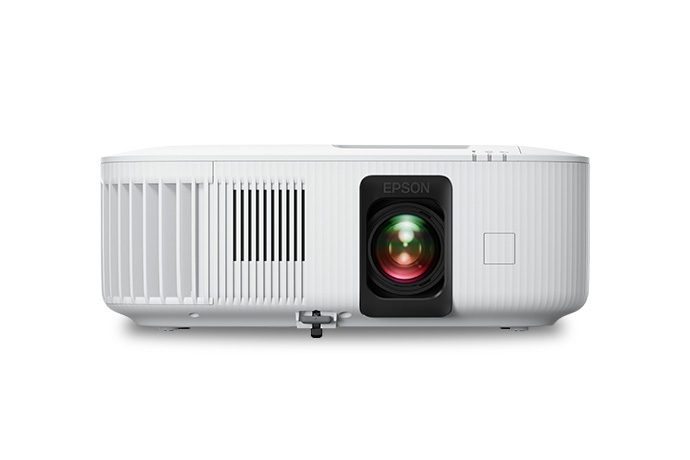
Epson Home Cinema 2350: Key Specifications
- Display technology: True 3-chip 3LCD
- Native resolution: 1920 x 1080, with 4K PRO-UHD pixel shifting (1920 x 1080 x 2, 4,147,200 dots)
- Brightness: 2,800 lumens colour (IDMS) and 2,800 lumens white (ISO)
- Contrast: Up to 35,000:1 in Dynamic mode, with auto iris
- HDR: HDR10 and HLG; up to 1.07 billion colours
- Lamp: 200W UHE; 4,500 hours Normal, 7,500 hours ECO
- Lens: Manual zoom 1.00–1.62x, manual focus, F1.49–1.77, 18.2–29.2mm
- Lens shift: Vertical plus or minus 60 percent
- Throw ratio: 1.32–2.15; image 40 to 500 inches
- Keystone: Auto vertical ±30°, manual horizontal slider ±30°, four-corner adjustment
- Input lag (measured): 18ms at 1080p/120Hz, 26ms at 1080p/60Hz, 19ms at 4K/60Hz, 67ms at 4K/30Hz
- Speaker: 10W monaural bass-reflex
- Smart platform: Included Android TV player, Google Assistant voice search
- Connections: 2 x HDMI 2.0b, HDCP 2.3 (one ARC, one normally used by the Android TV player), USB-A for player power, USB-B service, 3.5mm audio out, Bluetooth 5.0 audio for streamed content
- Fan noise: Rated 36 dB Normal, 32 dB Quiet; independent results vary by lamp level
- Size and weight: 13.1 x 10.8 x 4.8 inches; approximately 9.0 lb
- Support: Two-year limited projector warranty, 90-day lamp coverage
✓ Pros
- Measured brightness meets and slightly exceeds its rating, with strong output in usable modes
- Equal colour and white brightness from true 3-chip 3LCD — vivid colour in ambient light, zero rainbow artefacts
- Fast gaming response: 18ms at 1080p/120Hz and 19ms at 4K/60Hz
- Generous 1.62x zoom plus ±60 percent vertical lens shift for flexible installation
- Android TV player with authorised Netflix app and voice remote — a true all-in-one
- Capable built-in 10W speaker, plus ARC, audio out, and Bluetooth upgrade options
- Deep calibration controls allow a measurably more accurate picture than the factory settings
✗ Cons
- Not native 4K — pixel-shifted image is sharper than 1080p but softer than true UHD
- Lifted black levels and modest native contrast limit dark-room cinema performance
- Streaming player forces HDR and BT.2020 output onto standard content, oversaturating it
- 4K/60Hz input restricted to 8-bit 4:2:0 signals; higher-quality 4K/60 signals are rejected
- Fan clearly audible on high lamp power when seated nearby; unit exhausts noticeable heat
- Effectively one free HDMI input once the streaming player is installed; remote not backlit; no 3D
- Lamp is a consumable — 4,500 hours in Normal mode, with only 90 days of lamp warranty
Two details matter. First, colour brightness counts as much as white brightness: a single headline figure can hide weak colour output, while Epson rates both at 2,800 here.
Second, this is a 1080p native projector doubling its pixels through shifting to approximate 4K — a real step up from plain 1080p, but not a native 3840 x 2160 panel.
Epson Home Cinema 2350: Design & Build
The 2350 uses a clean, compact, mostly white enclosure that looks like modern living-room equipment rather than office hardware. At 13.1 inches wide, 10.8 inches deep, and 4.8 inches tall, and about nine pounds, it fits on racks and bookshelves where larger home cinema projectors cannot.
Epson positions that compact footprint as part of the appeal, and rightly so: a projector living permanently in a shared room must earn its shelf space visually as well as technically.
Build quality is sensible rather than luxurious. The shell feels sturdy, the lens gets a protective cover, and an interface cover tidies the rear connections.
Adjustable feet help level the image on uneven furniture, although one reviewer found the front foot a little wobbly — a minor concern for a fixed install, more relevant if you pack away often.
The remote is well laid out, with direct app buttons and Google Assistant voice search, but it is not backlit — a genuine annoyance in a dark room. Ventilation shapes placement too: give the vents clearance, avoid tight cabinets, and consider seating position relative to heat and fan noise.
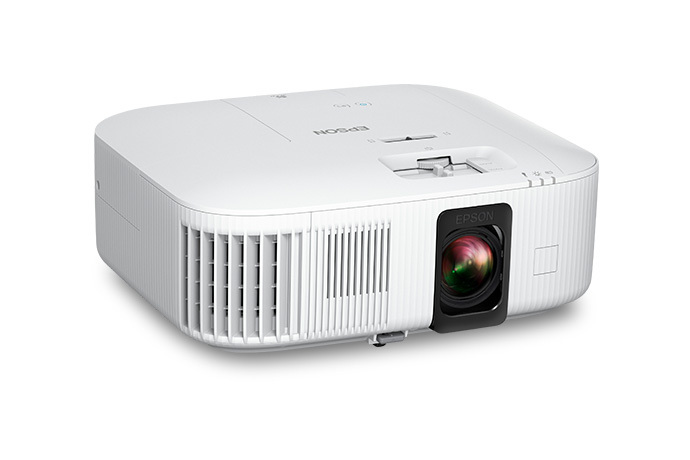
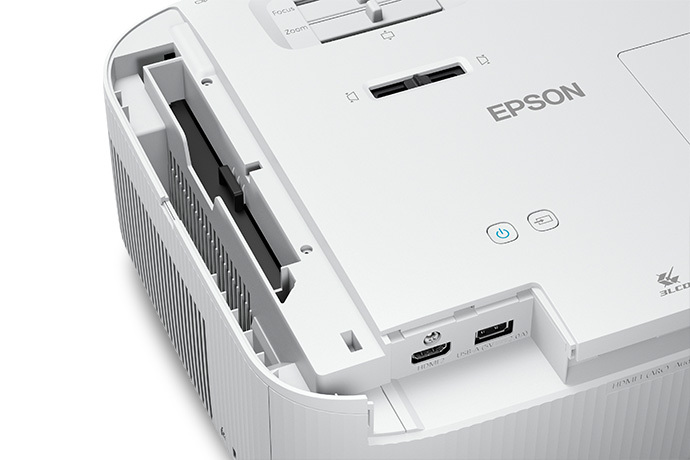
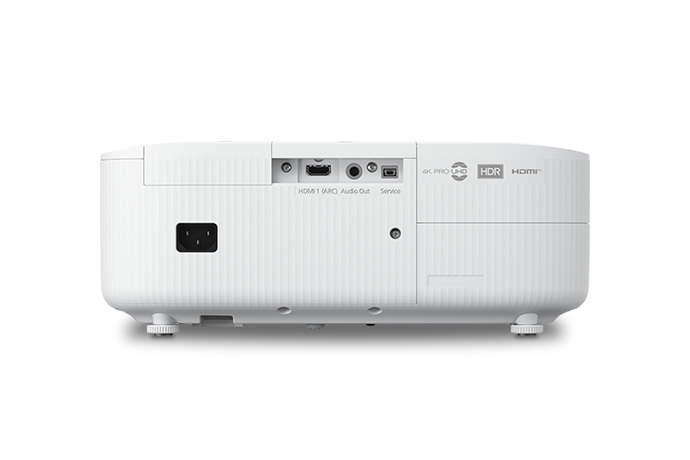
On the rear, a recessed compartment houses the Android TV player, its HDMI and USB power cables routed neatly out of sight, leaving the second HDMI input — with ARC — free for a console, disc player, or receiver.
Epson Home Cinema 2350: Features
4K PRO-UHD Pixel Shifting and HDR10
4K PRO-UHD combines resolution enhancement with colour and image processing. The native chips are 1920 x 1080, and the system shifts each pixel to place twice as many dots on screen.
Against plain 1080p, the gain in perceived detail is obvious on large screens — fine textures, distant scenery, and game text all benefit. Against true native 4K, the image is somewhat softer and does not fully resolve a complete UHD test pattern.
Both statements are true, and an honest review should hold them together.
HDR support covers HDR10 and HLG, with a dedicated adjustment trading highlight detail against overall brightness. Too aggressive, and bright skies and explosions clip to white; too conservative, and the image loses the point of HDR.
Independent viewing found convincing HDR with occasional clipped highlights — typical of projector HDR generally.
True 3-Chip 3LCD Colour
Three separate LCD chips, one each for red, green, and blue, display the complete RGB signal for every frame.
Colour brightness therefore matches white brightness, so saturated scenes do not dim, and rainbow artefacts — the brief colour flashes some viewers see on single-chip colour-wheel designs — simply do not occur. If anyone in your household is rainbow-sensitive, this alone can decide the purchase.
Gamut coverage is the more critical side. Independent measurement found about 92.5 percent of Rec.709 for HD content and about 73.2 percent of DCI-P3 for HDR. Most colours reproduce well, but the most saturated reds and greens fall short of their targets, and no calibration can invent missing gamut.
Each mode carries a slight out-of-box colour bias; calibration helped, bringing average colour error to about 2.1 Delta E.
Lens Shift, Zoom, and Throw Distance
Installation flexibility is where the 2350 quietly beats many rivals. The 1.62x manual zoom is generous, and vertical lens shift of plus or minus 60 percent moves the image optically, without tilting the projector or using image-softening digital keystone.
Many competitors offer no lens shift at all, forcing millimetre-perfect placement or permanent keystone use.
Throw distance needs planning in this long-throw design. A 100-inch 16:9 screen needs roughly 11 feet at mid-zoom — independent placement at 11 feet 3 inches confirms the range.
Working table by zoom: 80 inches needs about 8 feet 9 inches to 14 feet 4 inches; 100 inches, 11 to 17 feet 11 inches; 120 inches, 13 feet 2 inches to 21 feet 6 inches; 150 inches, 16 feet 6 inches to 26 feet 10 inches.
Measure before buying a screen. Longest zoom also costs a measured 5.9 percent of light.
Auto Iris and Image Controls
A high-speed auto iris adjusts light output scene by scene to improve perceived contrast. Frame interpolation smooths motion, image enhancement sharpens detail, and scene adaptive gamma adjusts dark-scene visibility.
Underneath sit proper calibration tools — two-point white balance, full colour management, custom gamma — unusual depth for a streaming-focused model.
Epson Home Cinema 2350: Performance
Brightness is the headline claim, and measurement supports it: 2,875 ANSI lumens in the brightest mode, slightly above rating. That mode, Dynamic, has a green bias, but usable modes stay strong on high lamp — Vivid 2,186 lumens, Cinema 1,957, Natural 1,892.
Standard lamp cuts output by about 16.4 percent, low by about 32.1 percent, yet low-lamp Cinema still gives roughly 1,328 lumens: plenty for a dark room, with longer lamp life and less fan noise.
In practice, the picture is bright and punchy at 100 to 120 inches in a dark or dim room. In direct daylight it washes out, as any projector at this level does, but with moderate ambient light it holds up far better than dimmer models — precisely its design brief.
Our explainer on how many lumens you need for a projector translates these numbers into room conditions.
Contrast needs the honest paragraph many reviews skip. The 35,000:1 figure is a dynamic rating achieved with the auto iris; native contrast is far more modest — one lab measured ANSI contrast in the low hundreds to one — and the black floor is visibly lifted.
Night scenes either crush detail or look slightly grey, depending on your settings bias. For colourful films, sport, and most games this rarely intrudes; for dark cinema in a blacked-out room, it is the main reason to step up instead.
Sharpness and motion sit in a happier middle ground: the pixel-shifted image is clearly finer than 1080p, game HUD text stays legible, and motion handling was praised in independent viewing. Brightness uniformity measured about 80 percent — slightly visible on solid colour screens, not in moving content.
Fan noise depends entirely on lamp level. Epson rates 36 dB normal and 32 dB quiet.
Independent measurement at about four and a half feet found roughly 34 to 36 dBA on low lamp, 36 to 39 dBA on standard, and 38 to 42 dBA on high, front and right sides loudest; another lab recorded 41 dBA overall.
On low or standard, the fan is background noise noticed in silent scenes; on high, seated nearby, it is plainly audible, and the unit warms the room.
Lamp life is rated at 4,500 hours Normal and 7,500 hours ECO.
At three hours a day, that is roughly four years, or nearly seven on eco, before replacement — though a lamp is a consumable a laser model lacks, and lamp warranty is only 90 days against two years for the projector.
See our guide on how long projector bulbs last for background.
Epson Home Cinema 2350: Picture Modes
Four colour modes — Dynamic, Vivid, Natural, and Cinema — are shared between standard and HDR content. Each makes a different brightness-versus-accuracy trade, and the measured gaps are large.
Dynamic Mode
Dynamic is the brightness champion at 2,875 lumens on high lamp, with a noticeable green bias that makes skin tones look wrong for serious viewing. Its uses are narrow: very bright rooms, presentations, or daytime sport where punch beats fidelity. For films, it is the wrong starting point.
Vivid Mode
Vivid measured 2,186 lumens and leans toward blue. Built for living-room viewing with some ambient light, it suits animation, casual television, and sport with a punchy, saturated character — lively rather than accurate, by design. With lights partly up, it will likely become your everyday mode.
Natural Mode
Natural measured 1,892 lumens on high lamp with a slight green bias, yet responds very well to adjustment — independent calibration chose it as the base for standard content. Think of it as the best raw material if you will spend twenty minutes with white balance and gamma.
Cinema Mode
Cinema measured 1,957 lumens, leans warm and red, and was judged the most suitable mode out of the box for standard and HDR film viewing.
Start with gamma minus one for standard content and zero for HDR; for HDR, standard or high lamp with a mid-range HDR brightness setting gave the most convincing results. If you change nothing else, start films here.
Audio
The 10W monaural bass-reflex speaker performs better than its specification suggests. Independent listening found it fairly loud with little distortion at normal levels, reaching comfortable volume well below halfway, with dialogue clear enough for films, sport, and casual gaming — ideal for shelf use without wiring a full system every time.
Its limits are predictable: no stereo separation from a mono speaker, and thin lower mid-bass, so action films lack weight. Treat it as a good convenience feature, not an end point.
Upgrades are well covered — ARC over HDMI for a soundbar or receiver, a 3.5mm output, and Bluetooth for wireless audio — with one limitation many reviews miss: Epson states Bluetooth audio works only for Android TV content, not for sources arriving over HDMI.
Console gamers wanting wireless headphones should connect through the console or receiver instead.
Smart Features & OS
Streaming comes from the included Android TV player, tucked into its own compartment with the major services — Netflix, Prime Video, Disney+, Hulu, HBO Max, YouTube, and live television apps, subject to subscriptions and region.
Crucially, it is authorised for the official Netflix Android TV app, unlike many Android projectors using unofficial workarounds. Google Assistant voice search is built into the remote.
Daily performance is adequate rather than fast — this is streaming-stick hardware.
The bigger issue, a clear gap in most rival coverage, is a colour quirk: independent reviewers found the player outputs BT.2020 colour and HDR for everything, including standard Rec.709 SDR content, oversaturating it; forcing correct settings produced a washed-out image instead.
HDR content is unaffected, and the workaround is simple — plug in your own streaming stick, which fits the same compartment. The Apple TV app was also found incompatible with the included player in at least one review.
Confirm the official feature list on the Epson Home Cinema 2350 product page.
Gaming: Input Lag by Resolution, Refresh Rates, and the Fine Print
Gaming is a headline reason to buy this projector, so here is the full measured picture instead of the single marketing number. Epson advertises input lag under 20 milliseconds.
Independent measurement found a far more useful breakdown: 18 milliseconds at 1080p and 120Hz, 26 milliseconds at 1080p and 60Hz, 19 milliseconds at 4K and 60Hz, and 67 milliseconds at 4K and 30Hz.
The same results appeared on both the Game and Cinema EDID settings, suggesting a consistent processing path rather than a hidden mode you must hunt down.
Read those numbers as a player. At 1080p/120Hz — the performance mode consoles use in many titles — 18 milliseconds is genuinely responsive for shooters, racing, and fighting games, short of elite competitive play. At 1080p/60Hz and 4K/60Hz, the high-teens to mid-twenties stay perfectly playable for most games.
At 4K/30Hz, 67 milliseconds is noticeably sluggish: set consoles to favour performance or 60Hz output and the problem disappears.
The signal fine print matters too. The projector accepts 4K/60Hz only as 8-bit with 4:2:0 chroma; send higher bit depth or 4:2:2, and it returns a no-signal screen. One reviewer also found a console offering 1080p with HDR or 4K without HDR, not both together.
None of this prevents excellent gaming — 1080p/120Hz looks superb at 100 inches — but buyers expecting an unrestricted 4K/60 HDR path like a modern television will be disappointed.
Note also: no 3D support, unlike several earlier Epson models.
Who Should Buy / Who Should Skip
Buy it if…
you are a console gamer who wants 100-plus inches with response times that stay out of your way, especially at 120Hz. Buy it if your viewing room doubles as a living room, with lamps and some daylight, and you need brightness and colour that survive real life.
Buy it if this is your first projector and you value the complete package — streaming in the box, a usable speaker, forgiving lens shift, and controls deep enough to grow into.
Buy it, too, if anyone in the household sees rainbow artefacts on single-chip designs; 3LCD removes that risk entirely.
Skip it if…
you are building a dedicated blacked-out cinema where black-level performance is the top priority. Skip it if you demand native 4K and sit close to a very large screen.
Skip it if you need unrestricted 4K/60 HDR handling from a high-end gaming PC, if absolute silence matters with seating a few feet away on high lamp, or if you still watch a 3D collection this model does not support.

Alternatives to Consider
Epson Home Cinema 3200. The closest Epson step-up keeps 4K PRO-UHD shifting and adds a higher rated contrast figure, 3D support, and broader 4K/60Hz compatibility, in a larger, less streaming-focused package.
BenQ TK700. A gaming-focused DLP rival with native 4K resolution and even lower measured lag at 1080p/120Hz. Sharper and faster for competitive players, with the DLP caveats of possible rainbow artefacts, no comparable lens shift, and weaker built-in smart features.
Epson Home Cinema 2250. The predecessor remains sensible if native 1080p, Android TV convenience, and strong colour are enough, without pixel-shifted 4K, 120Hz gaming, or the wider lens shift.
BenQ HT2060. A 1080p LED alternative for film-first buyers in darker rooms, with strong colour accuracy, solid contrast for its class, and no lamp to replace — but no 4K acceptance or 120Hz gaming.
Frequently Asked Questions
Is the Epson Home Cinema 2350 true 4K?
No. It is a native 1920 x 1080 projector using 4K PRO-UHD pixel shifting to place 4,147,200 dots on screen — twice the pixels of standard 1080p. The result is visibly sharper than 1080p and accepts 4K inputs, but it does not fully resolve native 3840 x 2160 detail like a true 4K panel.
What is the input lag on the Home Cinema 2350 for gaming?
Independent measurement found 18ms at 1080p/120Hz, 26ms at 1080p/60Hz, 19ms at 4K/60Hz, and 67ms at 4K/30Hz. The 120Hz and 60Hz modes feel responsive for all but elite competitive play. Avoid 4K/30Hz for games, and note that 4K/60Hz is accepted only at 8-bit with 4:2:0 chroma.
How far away does the 2350 need to be for a 100-inch screen?
With its 1.32–2.15 throw ratio and 1.62x zoom, a 100-inch diagonal 16:9 image needs roughly 11 to 18 feet depending on zoom, with about 11 feet 3 inches confirmed in independent placement at modest zoom. Measure your room and choose screen size together before installing.
How long does the lamp last, and is it replaceable?
The 200W UHE lamp is rated at 4,500 hours in Normal mode and 7,500 hours in ECO mode, and it is a replaceable wear item. ECO mode in dark rooms extends lamp life substantially and reduces fan noise. Lamp warranty coverage is 90 days, separate from the two-year projector warranty.
Does the Home Cinema 2350 work in a bright room?
It works well in moderate ambient light thanks to measured output meeting its 2,800-lumen rating and equal colour brightness from 3LCD. In direct daylight, the image still washes out, as with any projector at this level. Curtains and the Vivid or adjusted Dynamic mode give the best bright-room results.
Can I use my own streaming stick instead of the included Android TV player?
Yes. The included player lives in a rear compartment and connects by HDMI and USB power, and a different streaming stick can be installed in its place. That is also the simplest fix for the included player’s habit of outputting HDR and BT.2020 colour for standard content, which can oversaturate ordinary SDR streaming.
Bottom Line
The Epson Home Cinema 2350 earns its place by matching what most households actually need.
Based on verified specifications and measured data, it delivers its promised brightness, colour that stays vivid with lights partly up, installation flexibility that forgives real rooms, streaming that works out of the box, and gaming response — 18 milliseconds at 1080p/120Hz — that makes a 100-inch screen a legitimate way to play.
For mixed movie, sport, and gaming use, that combination is hard to beat in one box.
Its compromises are equally clear: pixel-shifted rather than native 4K, lifted blacks, a streaming player that mishandles standard-content colour, restricted 4K/60Hz signals, an audible fan on high lamp, and a lamp that will eventually need replacing.
Buyers whose rooms match its strengths will be genuinely pleased; others now know which direction to look instead. That is what a good Epson Home Cinema 2350 review should do — match the right projector to the right room.
On that test, for bright rooms and big-screen gaming under one roof, the 2350 passes with distinction.