Epson Pro EX11000 Review (2026) — Wireless Laser Projector
Most business projectors ask you to choose: close the blinds for a decent picture, or keep the lights on and wash the image out. This Epson Pro EX11000 review exists because Epson built a machine that removes that choice.
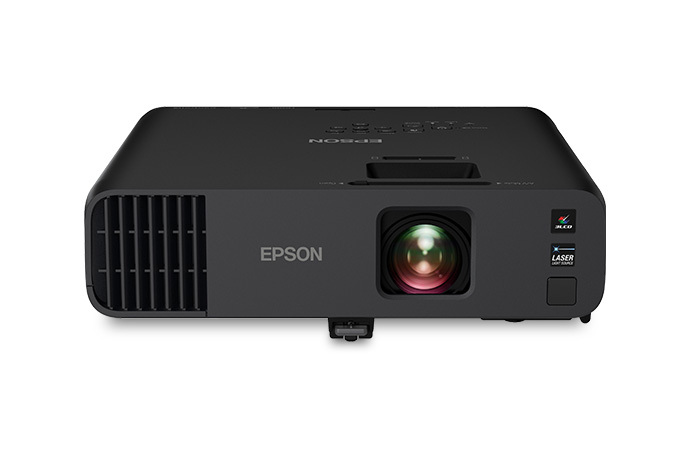
The Pro EX11000 is a 3LCD laser projector with 4,600 lumens of both color and white brightness, native Full HD 1080p, Miracast screen mirroring, and a laser light source rated for up to 20,000 hours with no lamps to replace — exactly the recipe for a boardroom, classroom, training room, or large meeting space where the lights stay on, and content must stay readable from the back row.
Epson Pro EX11000 Review: A Business-First Laser Projector That Refuses to Dim
Be clear about what it is: a business and large-venue machine first, and a home entertainment projector second. It has no HDR, no 3D, no built-in streaming apps, and no gaming-grade input lag. Its picture modes, ports, split-screen tools, and even its carrying case all point at work.
Bring it home expecting a dedicated cinema experience and parts of it will plainly miss the point; install it where it was designed to live, and the picture changes completely.
The short verdict, based on verified specifications from Epson and measured data, is this: the Pro EX11000 is one of the most sensible bright-room business projectors in its class because it pairs genuinely high color brightness with a native 1080p image, a flexible 1.6x zoom lens, and ownership that asks almost nothing of you for years.
Its weaknesses are just as clear — fan noise at full power, a 9.5-pound body that is luggable rather than truly portable, mediocre black levels for dark scenes, and wireless casting that suits slides far better than fast video.
This review also covers the points most short reviews skip: fan noise in decibels, what 20,000 hours really means, throw distances for large rooms, and what wireless presenting can and cannot do.
If you are still working out brightness for your own space, start with our guide on how many lumens you need for a projector — it will help you judge whether 4,600 lumens is right-sized for your room or more than you will ever use.
Epson Pro EX11000: Key Specifications
- Model: Epson Pro EX11000 (V11HA72220)
- Display technology: 3-chip 3LCD, laser-phosphor light source
- Native resolution: Full HD 1920 × 1080, 16:9 (resize support for 16:10 and 4:3)
- Brightness: 4,600 lumens color brightness (IDMS rated) and 4,600 lumens white brightness (ISO rated)
- Contrast ratio: Up to 100,000:1 dynamic
- Color reproduction: Up to 1.07 billion colors
- Light source life: Up to 20,000 hours (Normal and Quiet modes)
- Lens: Manual focus and manual 1.6x optical zoom, F-number 1.51–1.77, focal length 18.2–29.1 mm
- Throw ratio: 1.32–2.12; projected image size 31 to 310 inches
- Keystone: Automatic vertical ±30 degrees, manual horizontal ±30 degrees, plus horizontal keystone slider and built-in picture skew sensor
- Speaker: Built-in 16 W mono speaker
- Fan noise: 37 dB in Normal mode, 27 dB in Quiet mode
- Connectivity: 2 × HDMI, 2 × VGA (one configurable as monitor-out), USB Type-A, USB Type-B, LAN (RJ-45), composite video, audio in and 3.5 mm audio out, built-in Wi-Fi, Wi-Fi Direct and Miracast
- Power consumption: 272 W in Normal/Custom mode, 199 W in Quiet/Extended mode
- Dimensions and weight: 12.8 × 11.8 × 4.1 inches (W × D × H), 9.5 lbs
- In the box: Projector, power cable, remote control, batteries, Quick Setup Guide and carrying case
- Warranty and support: Standard 1-year limited warranty with full-unit replacement and free technical phone support for the life of the product, per Epson
✓ Pros
- True 4,600 lumens of both color and white brightness — colorful content stays bright with the lights on
- Native 1080p 3LCD chips deliver crisp small text and fine graphics detail, with no rainbow artifacts
- Laser light source rated up to 20,000 hours, with no lamp replacements and fast startup
- Flexible 1.6x optical zoom, auto vertical keystone, horizontal slider and skew sensor make setup forgiving
- Excellent collaboration toolkit: Miracast, Wi-Fi Direct, iProjection and two-way or four-way split screen
- Constant-brightness and custom power settings help the image stay consistent as the laser ages
- Strong 16 W built-in speaker for medium rooms, with audio-out for larger spaces
✗ Cons
- No HDR, no 3D, and no built-in streaming apps — a separate streaming device is required for entertainment apps
- Input lag of 54.5 ms rules it out for competitive gaming
- Fan noise of 37 dB at full power is audible in quiet rooms; Quiet mode trades brightness to reduce it
- Black levels and shadow detail are weak in dark movie scenes
- At 9.5 lbs, it is luggable rather than truly portable, and there is no lens shift or motorized lens
- Miracast does not help Apple users directly, and wireless casting is a poor choice for fast video
Full manufacturer details are listed on the official Epson Pro EX11000 product page.
Epson Pro EX11000: Design & Build
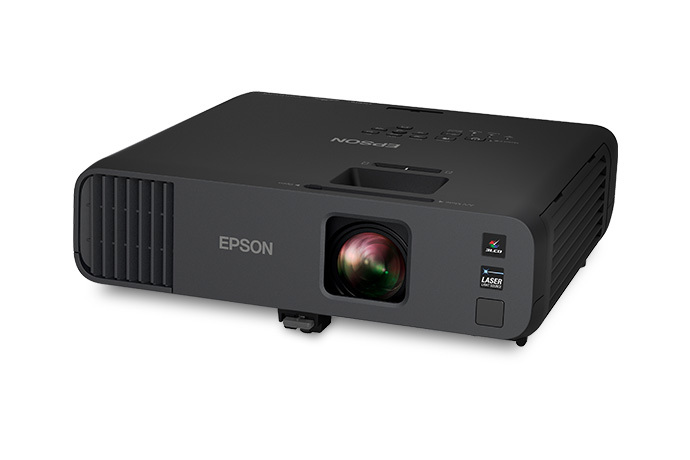
The Pro EX11000 looks like what it is: serious office equipment in a matte black housing, not a lifestyle gadget. At 12.8 by 11.8 by 4.1 inches and 9.5 pounds, it is substantial.
Epson includes a soft carrying case, and you can move it between rooms, but this is luggable rather than conveniently portable.
It suits a ceiling mount, a fixed table position, or a rolling AV cart far better than a daily commute — plan for two hands and the case, not a laptop bag.
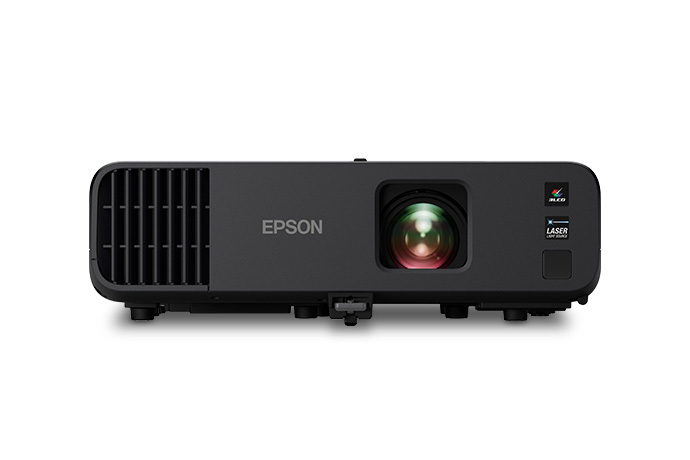
Build quality follows the business brief: a chassis made for repeated setup, a protected lens, and accessible top controls. Focus and zoom are manual, with no motorized lens or remote focus — normal for the class, but get them right at installation if you ceiling-mount it, because correcting them later means a ladder.
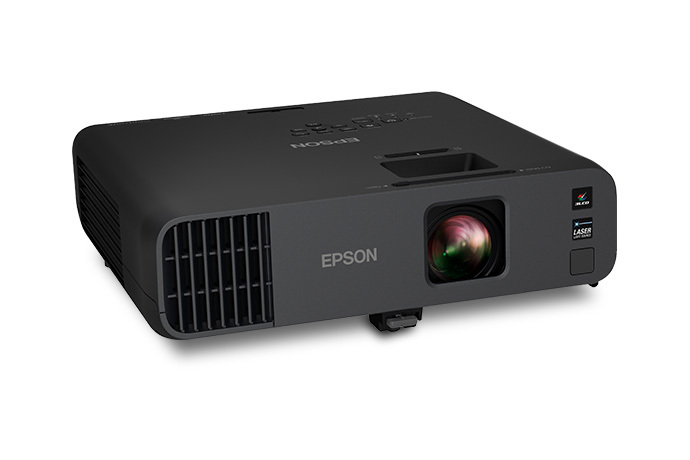
There is no lens shift. Placement flexibility comes from the 1.6x zoom and keystone correction, including a horizontal slider that helps when the projector cannot sit square to the screen. Use zoom first and keystone second — keystone always costs a little sharpness because it rescales the image, while zoom does not.
A 4,600-lumen laser engine also moves real air. Leave clearance around the vents, avoid closed cabinets without ventilation, and expect noticeable exhaust in a small, quiet room at full power — another reason it suits boardrooms, classrooms and halls better than a hushed home theater.
Epson Pro EX11000: Features
Native 1080p 3LCD Image — the Quiet Upgrade That Matters
The most important feature here is easy to miss. Its predecessor used lower-resolution chips with pixel shifting to put a 1080p-class image on screen, which could soften small text and add artifacts to fine patterns.
The Pro EX11000 uses native 1,920 × 1,080 LCD chips — 2,073,600 pixels per chip, times three — with no scaling tricks for a 1080p source. That is exactly where a business projector needs sharpness: small fonts in spreadsheets, footnotes on slides, and fine lines in charts.
It also accepts a 4K input and down-converts it cleanly to native 1080p.
The 3-chip 3LCD design brings a second advantage: color brightness equals white brightness, both rated at 4,600 lumens.
Single-chip designs can measure bright on white while delivering dimmer full-color images; here a colorful slide or video frame gets the full rated output, with no rainbow artifacts — the brief color flashes some viewers see with single-chip projectors — for anyone in the room to be distracted by.
Laser Light Source and the Real Meaning of 20,000 Hours
The laser-phosphor source is rated for up to 20,000 hours in both Normal and Quiet modes, with no lamps to replace. At four hours every working day, that is close to two decades of weekdays; at eight hours a day in a classroom, it is still many years.
Epson’s footnote adds the honest detail most listings omit: that figure is the approximate time until brightness falls to 50 percent, measured under accelerated test conditions, and other parts may need attention sooner. Laser projectors fade gradually rather than failing suddenly like a lamp.
Two power features make that lifespan more useful. A custom brightness setting lets you run the projector at the output your room actually needs instead of only full or eco power.
A constant-brightness option goes further: set a target below maximum, and the projector compensates as the light source ages, holding the image steady instead of slowly dimming. Startup is also fast — no lamp warm-up before a meeting.
Setup Tools: Zoom, Skew Sensor and Split Screen
Setup is built for presenters, not AV specialists. The skew sensor automatically corrects vertical keystone, the 1.6x zoom gives real placement range, and the horizontal slider fixes side-to-side misalignment.
A split-screen mode shows up to four sources at once — two laptops side by side, or four student screens in a classroom.
Edge Blending supports multi-projector wide displays in halls and houses of worship; if that is your use case, our guide to the best projector for church setups covers the wider installation picture. Crestron Connected, Control4 and Epson’s management tools round out the installed-use story.
Epson Pro EX11000: Performance in Bright Rooms
Brightness is the headline, and for once the headline is the story. Based on the verified specifications, 4,600 lumens is more than enough for a 300-inch, 1.0-gain screen in a dark room under SMPTE recommendations, and enough for roughly a 175-inch image in moderate ambient light.
Even the dimmer Cinema mode was easily bright enough for a 90-inch screen in a well-lit room. Presentations, spreadsheets, and video calls stay crisp with the lights on and blinds open — the entire reason this projector exists.
Remember, too, that the rating covers color as well as white, so colorful content avoids the hidden hit it takes on some rivals.
Text and graphics are where the native chips pay off: small fonts stay crisp, fine detail holds up, and most modes are presentable for presentations straight out of the box. Color accuracy is best in Cinema mode and acceptable in the others — good enough that nobody in a meeting will question a brand color.
The limits appear where you would expect: dark scenes. Contrast, shadow detail, and black level are not strong in any mode. A bright training video or news clip looks perfectly watchable; a moody night scene loses shadow detail and can look washed out.
Ambient light hides that weakness in a lit room — in a dark home cinema, where black levels are the whole game, it is exposed. Treat video as a strong secondary skill here, not the main event.
Fan Noise: the Number Most Listings Skip
Epson rates fan noise at 37 dB in Normal mode and 27 dB in Quiet mode. At 37 dB, the fan is audible in a quiet room — a soft rush that conversation covers easily, but that you will notice in silent pauses if listeners sit close.
At 27 dB, most meeting rooms mask it with ordinary background sound, at the cost of reduced brightness.
If the audience sits near the projector, run Quiet or a reduced custom setting — you have lumens to spare in most rooms — and reserve Normal power for large images or very bright spaces.
Throw Distance for Large Rooms
With a 1.32 to 2.12 throw ratio, this is a standard-throw projector, not a short-throw model.
Approximate lens-to-screen distances for a 16:9 image: 9.6 to 15.4 feet for 100 inches; 11.5 to 18.5 feet for 120 inches; 14.4 to 23.1 feet for 150 inches; and 19.2 to 30.8 feet for 200 inches.
The zoom gives freedom within each range, but a large image in a small room is not this projector’s trick — measure before you buy, especially for ceiling mounts.
Epson Pro EX11000: Picture Modes
The Pro EX11000 offers seven color modes, per Epson’s own documentation, and choosing the right one matters more than any other single setting. Brightness and color accuracy trade against each other across the list, so match the mode to the job instead of leaving the projector on one setting forever.
Presentation
It is the workhorse for color presentations in a bright room: high brightness, punchy color and maximum text legibility.
Dynamic
Dynamic pushes brightness and saturation hardest — Epson’s pick for games in a bright room — trading refined color for raw impact on the largest images.
Cinema
It trades some brightness for the best color accuracy of any mode; it is the smartest all-round choice for presentations with photorealistic images and the best starting point for video in a dimmer room.
sRGB
sRGB targets standard computer color, and in testing it preserved better shadow detail in dark scenes than Cinema — a good compromise for mixed content. Blackboard adjusts color for projecting onto a green chalkboard.
DICOM SIM
Simulates the DICOM standard for viewing medical images; Epson stresses it is for reference and education only, never diagnosis.
Multi-Projection
It minimizes color differences between multiple projectors, and also proved a surprisingly good compromise for dark-scene video.
For most owners, the shortlist is simple: Presentation for lit-room work, Cinema for accuracy, sRGB when dark clips are in the deck.
Audio
The built-in 16 W mono speaker is loud enough for a medium meeting room or classroom, and voices in video calls and training videos come through clearly.
Quality is thinner than the volume suggests, though: somewhat tinny, which matches the physics of a single small speaker. Music, film soundtracks, and larger halls will expose it quickly.
The fix is built in: a 3.5 mm audio-out port connects powered speakers, a soundbar, or a room audio system — plan on it for halls and large rooms. For a standard boardroom, the internal speaker is a genuine convenience, but treat it as presentation audio, not entertainment audio.
Smart Features & Connectivity
Be precise about the word smart here, because it is where buyers most often misread this projector. The Pro EX11000 has no built-in streaming platform, no app store, and no onboard Netflix or YouTube.
Its intelligence is about connection and collaboration: built-in Wi-Fi, Wi-Fi Direct, Miracast mirroring, iProjection presenting from phones, tablets, Chromebooks and computers, network control via Epson Projector Management or a web browser, and Crestron Connected and Control4 support.
Miracast deserves an honest assessment. For slides, documents, photos and web pages, mirroring from a compatible Windows or Android device is quick and genuinely liberating.
For motion-heavy video, it is the wrong tool: casting adds latency and depends on network quality, so fast scenes and lip-synced video belong on a cable. Miracast is also not AirPlay — Apple devices generally present via the iProjection app or a wired or streaming-stick route.
The dependable rule: wireless for convenience content, HDMI for anything where timing matters.
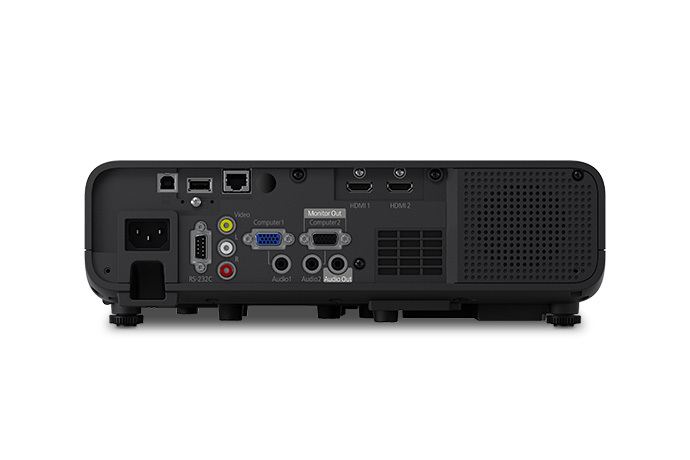
The wired selection is generous: two HDMI ports, two VGA ports (one configurable as monitor-out), USB Type-A for files from a USB drive or powering a streaming stick, USB Type-B, a LAN port, composite video for legacy sources, and audio in and out.
The USB power point is the quiet star — plug in a Fire TV, Roku, or Chromecast-style device and the projector becomes its big screen.
For a smaller, travel-first alternative, see our roundup of the best portable projector for business use; the EX11000 sits at the bright, install-ready end of that spectrum.
Gaming
This is not a gaming-first projector. 54.5 milliseconds at 1080p/60Hz with a Bodnar meter — fine for casual, slower-paced, and single-player games, but well behind dedicated gaming projectors, and competitive players in fast shooters will feel it.
There is no high-refresh gaming mode, and wireless casting only adds latency, so game over wired HDMI only. Buy it for work and enjoy casual games as a bonus.
Who Should Buy / Who Should Skip
Buy it if…
you run a boardroom, classroom, training room, lecture space, or house of worship where the lights stay on, and content must be readable from the back; if presenters arrive with different devices and need wireless sharing plus every legacy port; or if you want an installed projector you can forget about for years, with no lamp budget and no warm-up delays.
IT buyers will also value the network control, split-screen collaboration, and constant-brightness behavior.
Skip it if…
your main goal is home cinema — a dedicated model will give you HDR and deeper blacks, and our guide on how to choose a projector for home theater explains what to prioritize instead.
Skip it if competitive gaming matters, if you need grab-and-go portability, if your room is too short for a standard-throw lens, or if you expect built-in streaming apps. Those are simply different jobs than the one this projector was built to do.
Alternatives to Consider
Epson Pro EX9240:
The lamp-based sibling to cross-shop if portability matters more than laser ownership. it is nearly as bright and roughly three pounds lighter — you trade the no-lamp story for an easier carry and lamp replacements down the line.
BenQ LH730:
A business laser rival that scored higher for movies and video and adds HDR support; its single-chip design showed frequent rainbow artifacts, which the 3LCD EX11000 avoids entirely.
Epson’s larger Pro models:
If your venue is a large hall or sanctuary with very long throws, step up within Epson’s professional installation range instead.
A dedicated home theater projector:
If your shortlist started with movies rather than meetings, redirect entirely toward models built around HDR, contrast, and low input lag.
Frequently Asked Questions
Is the Epson Pro EX11000 good for a bright room?
Yes — that is its primary job. With 4,600 lumens of both color and white brightness, presentations, spreadsheets, and video calls stay legible with the lights on. Based on assessment, that output suits roughly a 175-inch image in moderate ambient light, and even the dimmer Cinema mode handled a 90-inch screen in a well-lit room.
How long does the laser light source really last?
Epson rates it for up to 20,000 hours in Normal and Quiet modes, with no lamps to replace. Epson’s own footnote clarifies that this is the approximate time until brightness falls to about half of its initial level under test conditions, so expect gradual fading over many years rather than a sudden failure — and consider the constant-brightness setting if consistent output matters.
Can I mirror my phone or laptop wirelessly?
Yes, via Miracast and Wi-Fi Direct from compatible Windows and Android devices, and via Epson’s iProjection app from a wider range of devices including Chromebooks and iOS.
Wireless mirroring works best for slides, documents, and photos; use an HDMI cable for fast video, because casting adds latency and depends on your network.
Is the Pro EX11000 good for gaming?
Only for casual play. 54.5 ms at 1080p/60Hz, which is acceptable for slower and single-player games but too high for competitive play, and there is no dedicated low-lag gaming mode. Always game over a wired HDMI connection, never over wireless casting.
Does it have Netflix or other streaming apps built in?
No. There is no built-in streaming platform. The USB port can power a streaming stick such as a Fire TV, Roku, or Chromecast-style device connected over HDMI, which is the intended way to add streaming apps, or you can present content from a laptop or phone.
How far away does it need to sit for a 120-inch image?
With its 1.32–2.12 throw ratio, a 120-inch 16:9 image needs roughly 11.5 to 18.5 feet from lens to screen, depending on the zoom setting. Measure your room before mounting, because this is a standard-throw projector, not a short-throw model.
Keeping the lens clean also protects sharpness over time — see our guide on how to clean a projector lens safely.
Bottom Line
The Epson Pro EX11000 does not try to be everything, and that focus is its strength.
Based on verified specifications, it delivers what a bright workspace needs: 4,600 lumens of color brightness that survives lit rooms, a native 1080p image that keeps small text crisp, and a 20,000-hour laser that removes lamp replacements and warm-up waits for years — plus a useful collaboration kit of Miracast, four-source split screen, network control and forgiving setup correction.
The trade-offs travel with it: no HDR or built-in streaming, weak black levels, 54.5 ms input lag, a 37 dB fan at full power, and a 9.5-pound body that belongs on a mount or cart. Judged as a home projector, those are serious compromises.
Judged as what it is — a wireless laser projector for boardrooms, classrooms, and large venues — they are the right compromises, made in the right places.
If your room is bright, your audience is large, and your content is work, the Pro EX11000 is easy to recommend and even easier to live with.