What Is Projector Screen Gain and Why It Matters 2026 – Complete Guide
If you have been comparing screens, you have probably wondered what projector screen gain is and why it matters enough to appear on nearly every spec sheet.
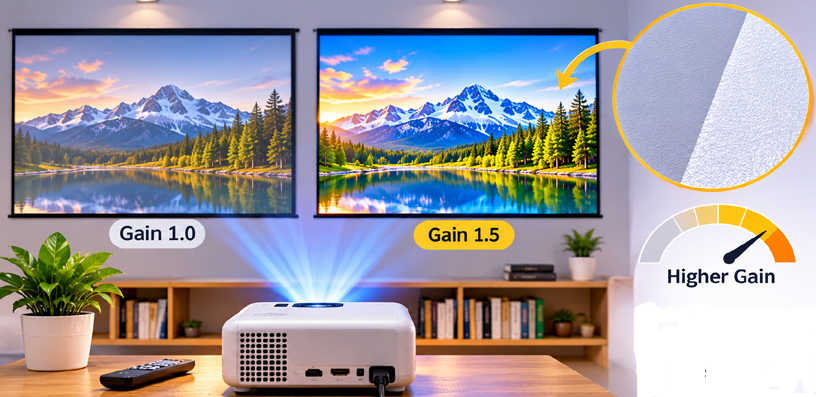
Gain is a single number, usually between 0.6 and 2.8, that describes how brightly a screen reflects light toward you compared with a plain matte white reference surface.
That one number quietly shapes almost everything you see: how punchy the image looks, how wide your seating can spread, and how well the picture holds up when some light is on in the room.
Get it wrong, and even a strong projector can look flat or uneven. Get it right, and the same projector suddenly looks like a bigger, better machine.
What Is Projector Screen Gain?
Gain is measured on-axis, meaning straight in front of the screen at its center. A gain of 1.0 means the screen reflects exactly as much light as the standard matte white reference used for comparison. Ordinary matte white screens, the most common type sold, typically rate between 1.0 and 1.1 gain.
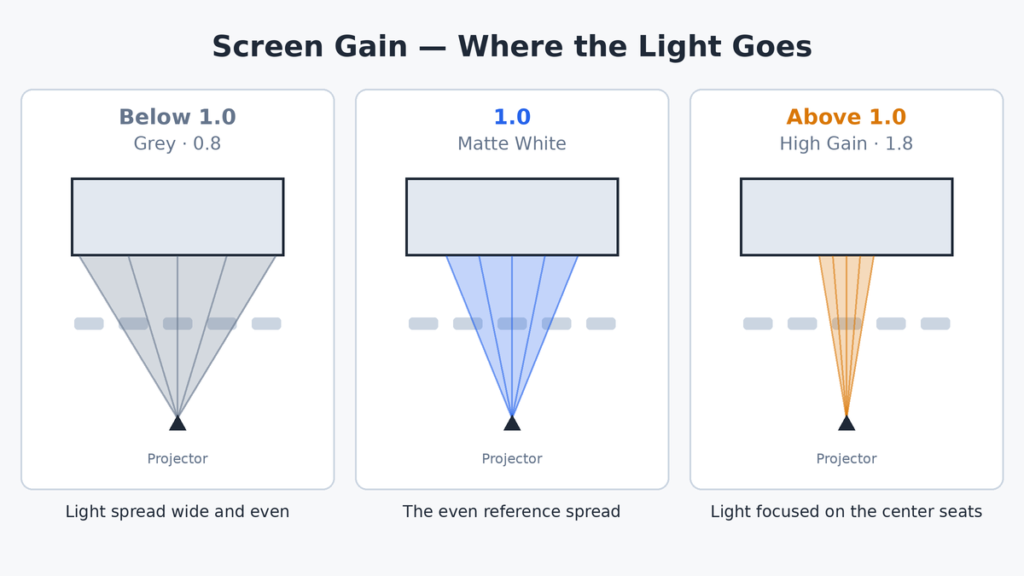
A screen rated below 1.0 reflects less light than the reference, so the picture looks dimmer at its peak. A screen rated above 1.0 concentrates more light toward the center seats, so the picture looks brighter from straight on.
Neither is automatically better; the number describes how the screen distributes light, not how good it is.
Think of it like a flashlight beam. A low-gain screen spreads light evenly in every direction, like a lantern. A high-gain screen focuses it into a narrower beam aimed at the middle of the couch, though the total light is similar — where it goes is what changes.
Low Gain vs High Gain: The Trade-Off in Plain Terms
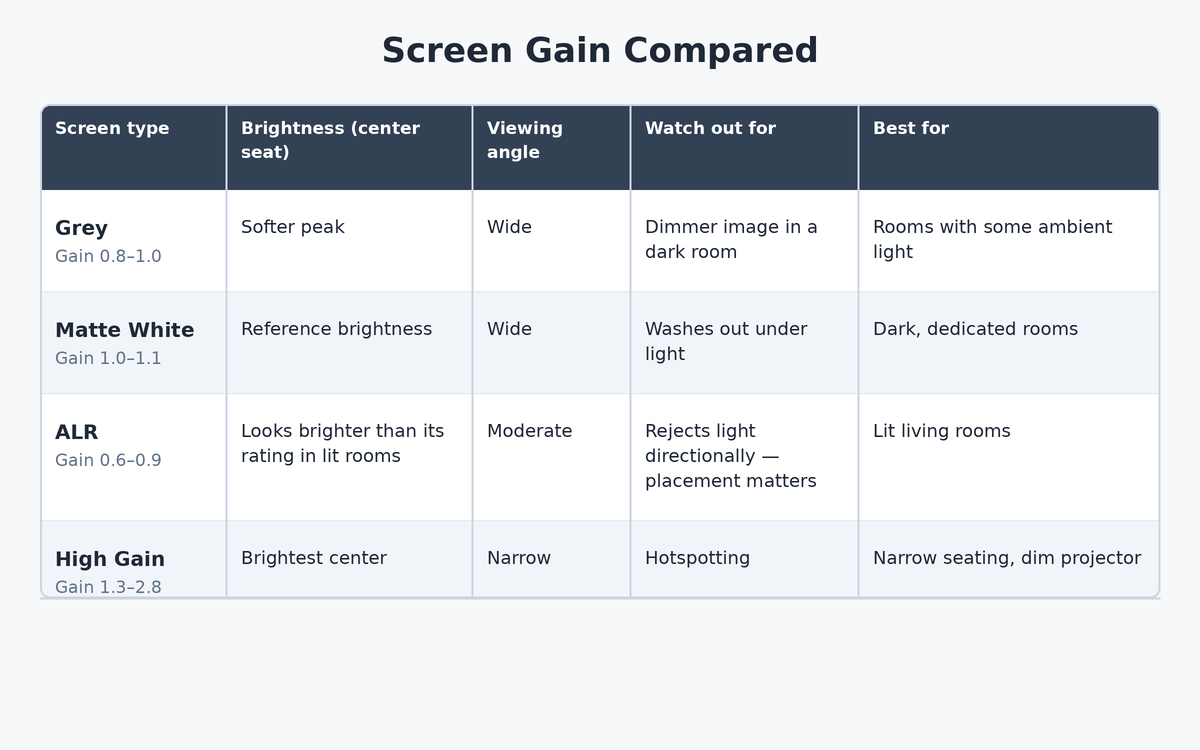
Grey screens usually sit between 0.8 and 1.0 gain. Because the surface is darker, peak brightness drops, but black levels look deeper and the image keeps more contrast when ambient light is in the room. For many living rooms, that trade is worth making.
High-gain screens, roughly 1.3 up to about 2.8, push brightness hard toward the center seats. That can help a modest projector in a bright space, but it comes with two costs: the useful viewing cone narrows, and the image can develop hotspotting, a visibly brighter patch in the middle that fades toward the edges.
Most fixed and outdoor screens, including the popular models in our best outdoor projector screen roundup, stay close to 1.0 gain precisely to avoid those compromises.
There is a reason the middle of the range is so crowded. A screen between 1.0 and 1.1 gain has no real weakness: it is bright enough for a dark room, honest from wide seating, and cheap to manufacture well.
Gain only becomes a decision that truly matters at the extremes, when a room is unusually bright, a projector is unusually weak, or the seating is unusually wide — and if none of those describes your setup, the standard matte white middle ground is not a compromise at all, but the sensible default that the other options exist to improve on for specific problems.
Why the Viewing Angle Shrinks as Gain Rises
Brightness is never lost; it is redirected. A high-gain screen achieves its bright center by sending less light out to the sides, so as viewers move off-axis, the picture dims faster than it would on a matte white surface.
Sit two people at the ends of a wide sofa in front of a 2.0-gain screen, and they may see a noticeably duller image than the person in the middle.
Seating layout therefore matters as much as the projector does. Narrow rows in a dedicated theater can tolerate higher gain because everyone sits near the center line.
A family room with chairs spread wide cannot, and mounting plays a supporting role too: a screen kept flat and plumb, as described in our guide to hanging a projector screen from the ceiling, keeps that reflection pattern even instead of warping it.
Gain, Contrast, and Ambient Light
Gain changes perceived contrast even though it does not change the projector itself. A lower-gain grey surface absorbs some of the stray light bouncing around the room, so blacks stay darker, and colors look richer when lamps or windows are adding light. In a fully dark room, that same screen simply looks a little dimmer.
Ambient light rejecting screens take this further: many ALR screens carry a modest gain rating, often 0.6 to 0.9, yet look brighter in a lit room than a 1.0 matte white screen.
That is because they reject light arriving from above and the sides while reflecting the projector’s light forward, so the rating alone does not tell the whole story. With ALR materials, direction matters more than the headline number.
Choosing the Right Gain for Your Room
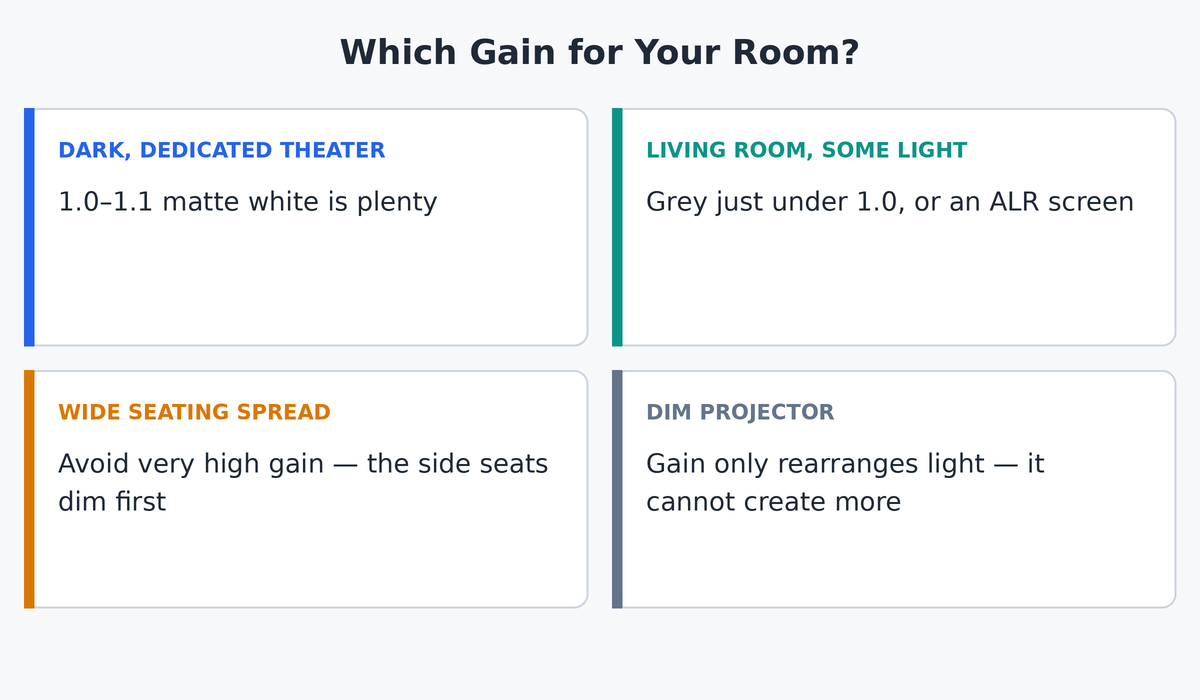
Start with the room, not the number. In a dedicated, light-controlled theater, 1.0 to 1.1 gain is plenty for almost any modern projector, and it gives you the widest, most even picture. There is no prize for extra gain you do not need.
In a living room with some light, a grey screen just under 1.0, or an ALR screen usually beats chasing high gain, especially paired with a reasonably bright projector. If your seating spreads wide, avoid very high gain altogether; the side seats will pay for the center seat’s brightness.
And remember that gain works together with size: a larger image spreads the same lumens thinner, so it helps to settle your projector screen size for your room before finalizing gain.
Finally, respect the limits. Gain cannot rescue a projector that is far too dim for the screen size and room; it can only rearrange the light that exists.
The pairing also works in reverse: a very bright projector can comfortably drive a lower-gain grey or ALR screen, trading surplus brightness for better blacks and light tolerance.
Where to Find a Screen’s Gain Before You Buy
The gain figure lives on the manufacturer’s spec sheet, usually listed as “gain” or “screen gain” alongside the material name and viewing angle.
Reputable brands publish it for every material they sell, and it is worth checking the viewing angle listed next to it, because the two numbers describe the same behavior from opposite ends.
Some budget screens omit gain entirely, which tells you something in itself: the material is almost always a basic matte white near 1.0, and the maker did not measure it carefully. If a screen advertises an unusually high gain with no viewing angle figure beside it, treat the claim with suspicion.
One more detail worth knowing: gain belongs to the material, not the frame or the brand. The same fixed frame is often sold with a choice of surfaces, each carrying its own gain, so two screens that look identical in a product photo can behave very differently in your room.
When you compare options, compare the material’s gain and viewing angle together, never the headline size or price alone.
Frequently Asked Questions
Is higher screen gain always better?
No. Higher gain only concentrates light toward the center seats. It narrows the viewing angle and can cause hotspotting, so it suits narrow seating and dim projectors, not every room.
Does screen gain change contrast?
It changes perceived contrast. Lower-gain grey screens deepen blacks and resist ambient light, so contrast looks better in lit rooms. In a dark room, a 1.0 screen usually shows the projector’s contrast most honestly.
Which matters more, screen gain or projector lumens?
They work together: lumens are the light you have; gain decides where it goes. A bright projector with a sensible gain beats a dim projector on a high-gain screen in almost every real room.
Does screen size change the gain?
No. Gain is a property of the screen material and stays the same at any size. A bigger screen does look dimmer with the same projector, but that is the image spreading thinner, not the gain changing.
Can I measure my screen’s gain at home?
Not precisely. Accurate gain measurement needs a calibrated reference surface and a light meter on-axis. At home, you can compare brightness from different seats, which reveals the viewing cone, but not a reliable gain number.
What gain is best for a living room?
Usually between 0.8 and 1.1. A grey screen just under 1.0, or an ALR screen, keeps contrast with some light on, while a plain 1.0 matte white works if you mostly watch after dark.
Are grey screens always low gain?
Most grey screens rate between 0.8 and 1.0, but color and gain are separate traits. Some grey ALR materials are engineered with reflective layers, so always check the spec sheet rather than assuming from the color.
Will a high-gain screen fix a dim projector?
Only partly, and only for the center seat. High gain rearranges existing light; it does not create more. If the projector is far too dim for the screen size, a brighter projector is the real fix.
Bottom Line
Screen gain is simply a measure of where a screen sends light: evenly in all directions at 1.0, dimmer but more forgiving below it, and brighter but narrower above it. Match the number to your room’s light and your seating width, not to the biggest figure on the box.
For most people, that means a screen near 1.0 gain, or a grey or ALR surface just under it for a living room, paired with a projector bright enough for the size — choose gain that way, and the number stops being a mystery and starts being a tool.