ViewSonic PX701-4K Review 2026 — Bright 4K Lamp Projector for Movies
Most 4K projectors ask you to choose: brightness for a living room, or speed for gaming, or a lamp you will be replacing before long. The ViewSonic PX701-4K tries to cover all three jobs in one plain white box.
This ViewSonic PX701-4K review looks at a 3,200 ANSI lumen DLP projector with a 4.2ms input lag rating, refresh support up to 240Hz, and a lamp rated for as long as 20,000 hours in its most frugal mode.
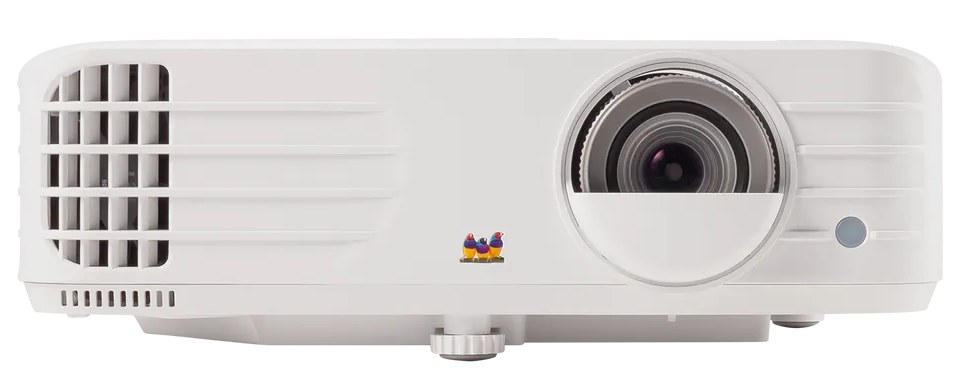
The recipe is deliberately old-school in places. There is no built-in smart platform, no laser light source, and no motorised anything. What you get instead is a bright lamp engine, a fast gaming path, flexible image correction — including warping for curved surfaces — and a throw that suits ordinary living rooms.
That combination will not suit everyone. But for buyers who want one projector for films, sport and a console in between, the PX701-4K makes a focused case for itself.
ViewSonic PX701-4K Review: The Verdict in Brief
The PX701-4K is a bright, fast, no-nonsense 4K projector for mixed living-room use. Its strengths are light output, genuinely low input lag at high refresh rates, a long potential lamp life in SuperEco mode, and setup tools that forgive imperfect placement.
Its compromises are equally clear: contrast is modest on paper, there is no smart system built in, the single 10W speaker is a starting point rather than a solution, and colour accuracy is something you improve with the picture modes rather than something you simply receive.
Buy the PX701-4K for a living room that hosts films, sport and games in roughly equal measure. Look elsewhere if you are building a dark-room cinema around black levels, or if you want apps without adding any extra hardware.
ViewSonic PX701-4K: Key Specifications
- Model: ViewSonic PX701-4K, DLP home projector
- Projection system: 0.47-inch DMD, 4K UHD
- Native resolution: 3840 × 2160
- Brightness: 3,200 ANSI lumens
- Contrast ratio: 12,000:1 with SuperEco mode
- Display colour: 1.07 billion colours, SuperColor technology
- Light source: 203W UHP lamp
- Lamp life: 6,000 hours Normal; 20,000 hours SuperEco
- Replacement lamp: RLC-126
- Lens: F2.0–2.05, f15.843–17.445mm; 1.1x optical zoom; 0.8x–2.0x digital zoom
- Throw ratio: 1.5–1.65
- Image size: 30 to 300 inches
- Throw distance: 1 to 10.96 m (100 inches at 3.32 m)
- Projection offset: 120% ±6%
- Keystone: Horizontal and vertical ±40°, auto vertical keystone, 4-corner adjustment, warping
- Digital lens shift: Up to 20% vertical and horizontal
- Input lag: 4.2ms
- Refresh rate: 23–240Hz vertical scan; 240Hz available on 1080p signals
- HDR: HDR and HLG support
- Inputs: 2 × HDMI 2.0 (HDCP 1.4/2.2)
- Outputs: 3.5mm audio out; USB Type A (5V/1.5A power, also service)
- Control: RS-232
- Speaker: 10W built in
- Noise: 32dB Normal, 28dB Eco
- Power consumption: 265W Normal; under 0.5W standby
- Dimensions: 312 × 222 × 108 mm (W × D × H, with adjustment foot)
- Weight: 2.8 kg net
- In the box: Power cord, remote control, quick start guide
Every figure above comes from ViewSonic’s published specification sheet for this model. Two deserve an early note: the contrast figure is quoted with SuperEco mode, and the 20,000-hour lamp-life headline belongs to that same mode — at full brightness, the rated lamp life is 6,000 hours.
✓ Pros
- 3,200 ANSI lumens in an honest, comparable standard — enough for lights-on sports and big screens
- 4.2ms input lag with up to 240Hz refresh on 1080p signals, rare at this level
- Native 3840 × 2160 output from the 0.47-inch DMD, with HDR and HLG support
- Lamp rated to 20,000 hours in SuperEco mode, and user-replaceable when it does fade
- Warping, auto vertical keystone, ±40° H/V keystone and 4-corner adjustment for awkward rooms
- Powered USB port runs a streaming stick, so the missing smart platform is easy to work around
- Compact 2.8 kg body with a simple, full-function remote
✗ Cons
- No built-in smart OS or apps — an external streaming device is part of the real setup
- 12,000:1 contrast is quoted in SuperEco mode; black levels are living-room grade, not cinema grade
- Headline lamp life drops to 6,000 hours at normal brightness
- Single 10W speaker is serviceable for dialogue, thin for films and games
- Only two HDMI inputs and no HDMI ARC/eARC for a soundbar connection
- 120% projection offset needs care with ceiling mounts and low tables
- Lens shift is digital only, so heavy correction costs resolution
Design & Build: Plain, Compact and Honest About It
The PX701-4K is a compact white box with a large offset lens, a front exhaust grille and very little decoration. At 312 × 222 × 108 mm and 2.8 kg, it is small enough to move between a shelf and a ceiling mount without drama. Nobody will mistake it for a design object, but it disappears on a ceiling or a side table, which is arguably the right ambition for a living-room projector.
Controls sit on the top panel: a small keypad covers power, menu navigation, source, blank and colour mode, so basic operation survives a lost remote. The zoom and focus rings are recessed into the top of the lens housing, clearly labelled and easy to reach on a table; ceiling-mounted, you set them once and leave them.
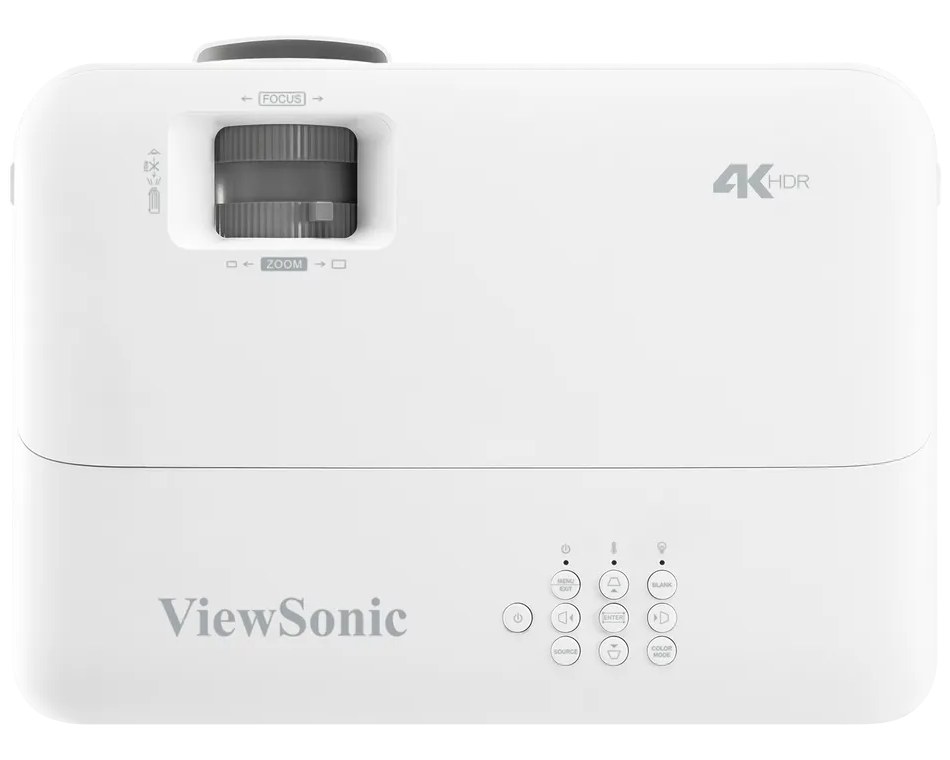
Build quality is functional rather than luxurious: office-projector plastics, a screw-type front foot, and a Kensington lock slot for shared spaces. Ventilation is generous, which matters — a 203W lamp makes heat, and the fan that clears it is rated at 32dB in Normal mode and 28dB in Eco.
Those noise figures put the PX701-4K in the middle of the lamp-projector pack. In a quiet film scene you will hear it if you sit close; with dialogue or Eco mode engaged, it fades into the room.
Picture Modes: Five Presets, Two User Slots, Separate HDR Sets
The PX701-4K organises its picture settings around five preset colour modes plus two user slots, and it keeps separate versions of those modes for SDR, HDR and HLG signals.
That structure matters: the settings you choose for a film do not have to be the settings your console uses, and HDR content gets its own calibration space instead of borrowing the SDR one.
Brightest
Brightest maximises light output and is the mode for rooms you cannot or will not darken: daytime sport, lights-on family viewing, a screen competing with lamps and windows. It is also the mode where colour takes the hit — expect a cooler, punchier image that stays watchable in ambient light but gives up subtlety. The trade is deliberate, and for a Saturday-afternoon match it is the right one.
Standard and Sports
Standard is the sensible default for everyday viewing in a dimmed room: balanced colour and brightness close to the projector’s best behaviour. Sports is tuned for well-lit rooms and fast motion, favouring vivid colour and punch for grass, kits and score graphics. Most owners will live between these two modes and the next one.
Movie
Movie is the accuracy-first preset, aligned to Rec.709 for SDR viewing in a low-light room, and the mode to choose for films after dark. As with most projectors, the most accurate mode is not the brightest, so reserve it for when the curtains are closed — in a lit room it will look flat next to Standard, through no fault of its own.
Gaming and User Modes
The Gaming preset pairs the picture side of the fast-input path discussed in the Gaming section below. Two User slots then let you store your own balance of brightness, contrast and colour temperature; the temperature presets run from 9500K down to 5500K, enough range to take the blue edge off Brightest mode if you use it often.
One honest note applies to every mode here. Preset names describe intent, not laboratory results, and no projector in this class arrives perfectly calibrated. The tools are all present — per-signal modes, user slots, temperature choices — but ten minutes in the menus is part of owning it well.
Features & Smart Platform: No Smart OS, and a Simple Workaround
Let us be direct, because this is the section where the PX701-4K differs most from the projectors it sits beside: there is no built-in smart platform. No app store, no home screen of streaming services, no voice assistant. Switch it on, and you get a picture menu, two HDMI inputs and a USB port.
For some buyers, that is a genuine drawback, and it is better to know it now than after unboxing. For others, it is close to a virtue: projector smart platforms age quickly, while the HDMI inputs here will accept whatever the current best streaming device happens to be, this year and in five years. ViewSonic’s wider range is on the ViewSonic website if you want to compare its smarter models directly.
The workaround is built into the back panel. The USB Type A port supplies 5V/1.5A power, enough to run a typical streaming stick from the projector itself, so the stick hides behind the unit and wakes with it. One HDMI input takes the stick, the other takes a console or Blu-ray player, and the missing platform stops mattering in practice.
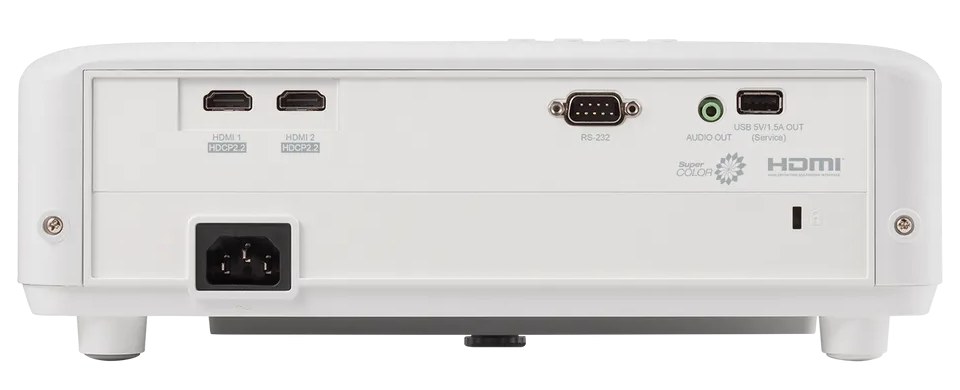
The rest of the connection panel is workmanlike: a 3.5mm audio output for powered speakers or headphones, RS-232 for control systems, and the Kensington slot. What is missing is HDMI ARC or eARC, so a soundbar cannot take audio back down the HDMI cable — feed it from the 3.5mm output or from your source device instead.
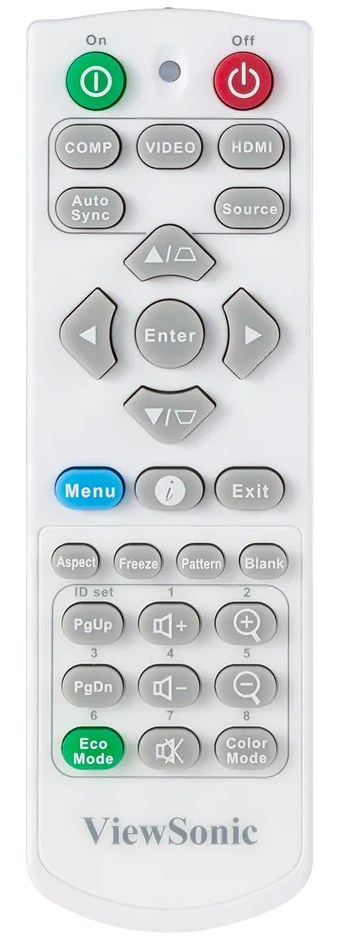
The bundled remote is a full-function unit rather than a minimalist wand: direct keys for source, colour mode, eco mode, aspect, freeze, pattern and zoom. It is the remote of a projector that expects to be adjusted, not just pointed at a streaming menu.
Performance: Brightness First, Contrast Kept in Proportion
Start with the figure that defines this projector: 3,200 ANSI lumens. ANSI is the standardised measure, so the number can be compared honestly against other projectors quoted the same way. In practice, that output is enough for a strong 100- to 120-inch picture in a dimmed living room, a watchable image with curtains drawn against daylight, and sport with some lights on.
If you are mapping brightness to your own room, our guide to how many lumens you need for a projector walks through the ranges room by room.
Resolution is the second strength. The 0.47-inch DMD produces a 3840 × 2160 picture, and at normal seating distances on screens up to around 120 inches, the step up from 1080p is easy to see in streamed 4K content, games and fine text. SuperColor processing covers the colour side, with a 1.07 billion colour palette, and HDR and HLG signals are both accepted.
HDR needs the usual honest framing for a bright lamp projector. The PX701-4K tone-maps HDR content sensibly, and highlights hold together better than on dimmer machines, but HDR on any projector is about graceful handling rather than television-style peak brightness.
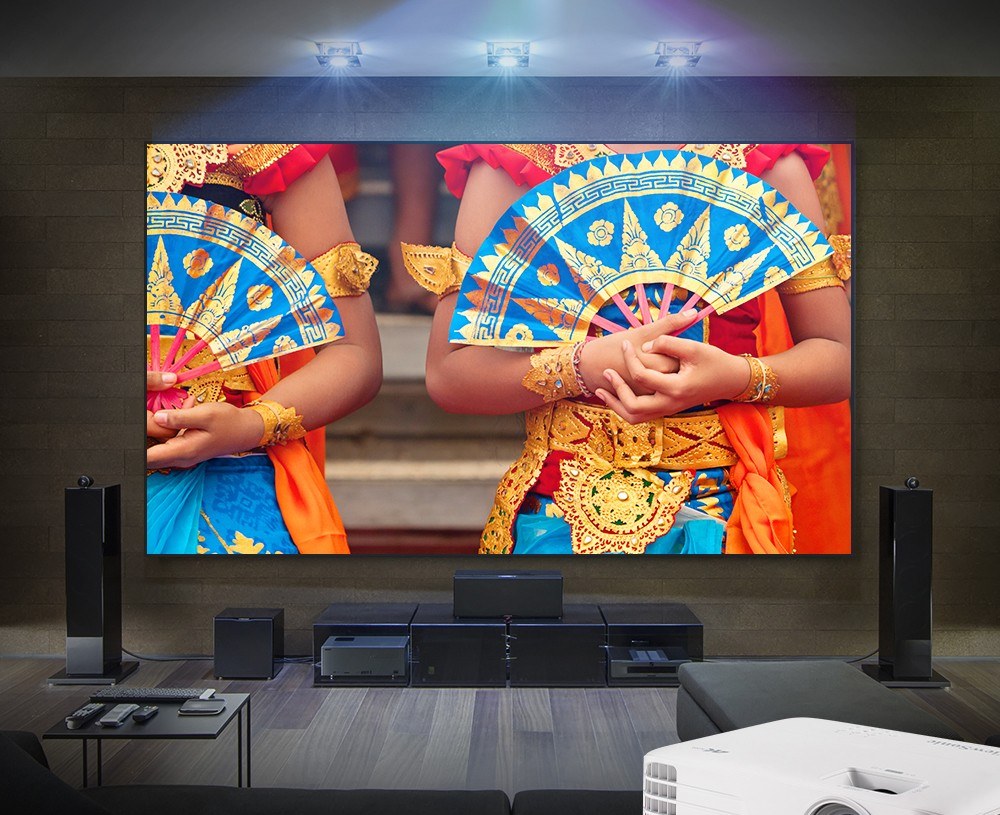
Contrast is where proportion matters. The quoted 12,000:1 figure is achieved with SuperEco mode, which dims the lamp dynamically, and it would be wrong to read it as a native contrast measurement. In a dark room, blacks render as dark grey rather than true black.
In the mixed lighting this projector is built for, the limit is far less visible — ambient light washes out the difference between good and excellent black levels long before the projector does.
The lamp deserves its own paragraph, because it shapes ownership. At full brightness, the rated life is 6,000 hours; in SuperEco it stretches to a headline 20,000 hours. Lamps also fade gradually rather than failing suddenly, and our explainer on how long projector bulbs last covers what that fade looks like in practice.
When the time comes, the lamp is a user-replaceable module (RLC-126), so the projector is not disposable — a point in its favour against sealed light engines.
Finally, the 10W built-in speaker. It is clear and loud enough for dialogue, news and casual viewing, and it saves the setup from silence when nothing else is connected. It has neither the bass nor the stereo width for films and games, so plan on an external speaker or soundbar through the audio output.
Gaming: The Headline Act
Gaming is where the PX701-4K stops being a generalist and starts being a specialist. ViewSonic rates input lag at 4.2ms, with refresh up to 240Hz — figures that belong to gaming monitors, not lamp projectors. A single frame at 60Hz lasts about 16.7ms, so a 4.2ms delay is roughly a quarter of a frame: your inputs land effectively when you make them.
The important detail is how the fast path is reached. The 240Hz refresh rate applies to 1080p signals, so the fastest, smoothest gaming this projector offers is at Full HD — the resolution most competitive play uses anyway.
Feed it a 4K signal from a console, and you get the big, sharp picture at standard refresh rates. Two different kinds of gaming, both served, but do not expect them in the same mode at the same time.
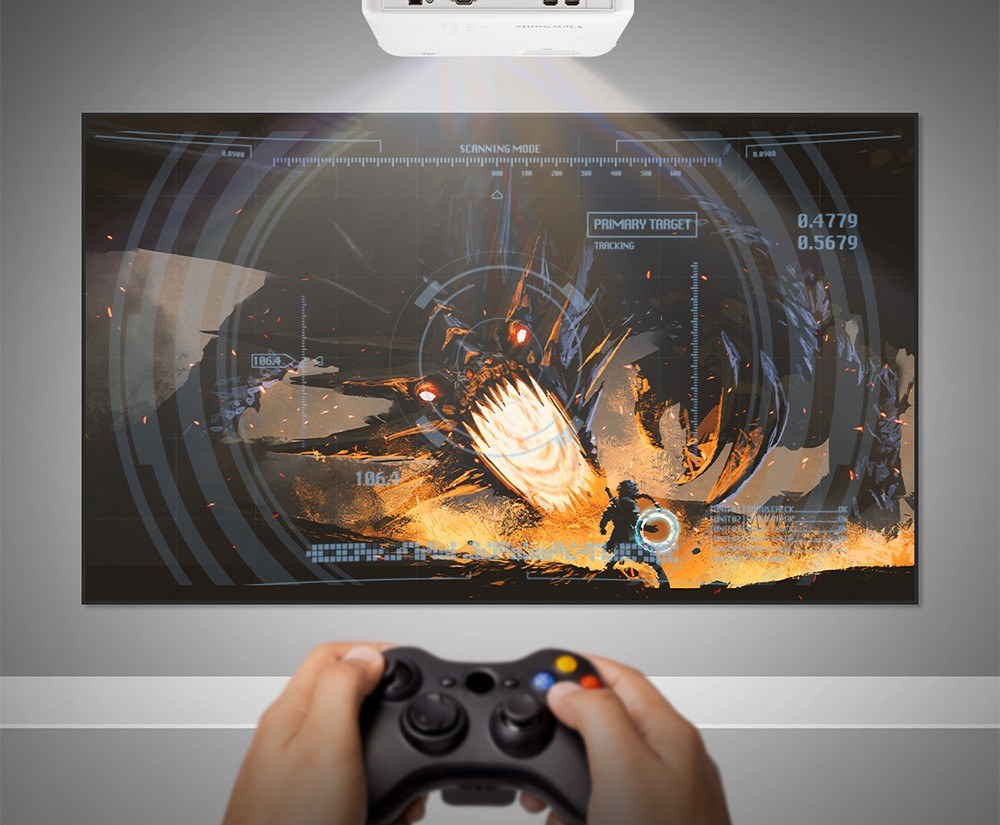
What is not on the specification sheet matters too. There is no variable refresh rate support and no automatic low-latency switching of the kind televisions advertise, so the routine is manual: pick the input, pick the Gaming mode, and play.
In return, you get motion clarity that makes fast pans and racing lines easy to read at 100 inches or more, in a picture bright enough that gaming does not have to happen in a cave.
For single-player adventures, sports titles, racing and fast shooters played for fun, this is one of the strongest gaming propositions in its class. Ranked players who want 4K and 120Hz-plus at the same time are asking for a different generation of machine — see the Who Should Skip section below.
Setup & Throw: Correction Tools That Forgive Real Rooms
The PX701-4K is a standard-throw projector with a 1.5–1.65 throw ratio and a 1.1x optical zoom. ViewSonic’s own figures put a 100-inch image at 3.32 m with the zoom at its widest, and the table below works the rest out from the same ratio, using the width of a 16:9 screen.
| Screen size (16:9) | Screen width | Throw distance |
|---|---|---|
| 80 inches | 1.77 m | 2.66–2.92 m |
| 100 inches | 2.21 m | 3.32–3.65 m |
| 120 inches | 2.66 m | 3.99–4.38 m |
| 150 inches | 3.32 m | 4.98–5.48 m |
Two placement facts need attention before the projector goes on a ceiling. First, the projection offset is 120% ±6%, meaning the image sits above the lens centre line by a fixed proportion — on a low table the picture may land higher than you expect, and on a ceiling mount it drops correspondingly.
Second, the lens shift is digital rather than optical. Measure the room first, as our guide to how to choose a projector for home theatre recommends, and the offset becomes a non-issue.
Where this projector genuinely excels is correction. Auto vertical keystone handles the common tilt case on its own; manual horizontal and vertical keystone each run to ±40°; there is 4-corner adjustment for screens that are not perfectly placed — and on top of that sits warping, the ability to bend the image to fit a curved surface, a feature borrowed from installation projectors and rare in a home model.
Use those tools in the right order. Position the projector as square and central as the room allows, use the optical zoom to size the image, then let keystone and corner adjustment handle only what is left. Every degree of digital correction spends pixels, and a nearly-square physical setup keeps the 4K detail you bought.
Ceiling mounting is straightforward at this weight, and ViewSonic lists a compatible wall and ceiling mount among its accessories. Table placement works just as well, and at 2.8 kg the projector can live in a cupboard between sessions — though the offset means you should test image height from your actual table first.
Who Should Buy / Who Should Skip
Buy the ViewSonic PX701-4K if…
your projector has to do everything: films at night, sports with the lights up, and regular gaming in between. It suits living rooms that cannot be fully darkened, console owners who will use the 1080p high-refresh path, and buyers who like that a fading lamp is a replaceable part rather than the end of the machine.
Skip it if…
you are building a dedicated dark-room cinema, where native contrast and black levels decide everything. Skip it if you want streaming apps built in with nothing else to plug in, if your soundbar plan depends on HDMI ARC from the projector, or if you need short-throw placement close to the wall.
And a specific honesty note: when NOT to choose the PX701-4K is when your gaming target is 4K at 120Hz or above from a current console or PC. This projector’s speed records are set at 1080p, and no setting changes that. If high-refresh 4K is the requirement, wait for or choose a machine built around that signal path instead.
It also holds the top spot in our guide to the best projectors under $1000 — this review is the long version of why.
Alternatives
Optoma UHD38x
The closest rival in spirit: a bright 4K DLP lamp projector that also chases gamers, with very high claimed brightness and its own low-lag, high-refresh 1080p path. The ViewSonic counters with warping and its 20,000-hour SuperEco lamp rating.
BenQ TK700
A 4K gaming projector from the other big DLP camp, built around console play with dedicated game modes and a slightly shorter throw that suits smaller rooms. The PX701-4K answers with more brightness on paper and the higher 240Hz ceiling at 1080p.
Epson Home Cinema 2350
The 3LCD alternative: strong colour brightness, no DLP rainbow effect for viewers who are sensitive to it, and a smart streaming platform built in. It gives up the extreme refresh rates and gains the easier out-of-the-box streaming experience that ViewSonic leaves to a stick.
Frequently Asked Questions
Does the ViewSonic PX701-4K have Netflix and other apps built in?
No. There is no built-in smart platform or app store. Connect a streaming stick, box, console or laptop to one of the two HDMI inputs instead — the powered USB port on the back can run a stick from the projector itself, which keeps the setup tidy.
Is the PX701-4K really 4K?
Yes. Its 0.47-inch DMD produces a 3840 × 2160 picture, which is the full UHD pixel count on screen. It also accepts signals from VGA up to 4K, and supports HDR and HLG content with separate picture settings for each.
What is the input lag on the ViewSonic PX701-4K, and can it do 240Hz?
ViewSonic rates input lag at 4.2ms, and the projector supports refresh rates up to 240Hz on 1080p signals. The fastest gaming path is therefore Full HD at high refresh; 4K signals are displayed at standard refresh rates.
How long does the lamp last, and can it be replaced?
The 203W lamp is rated for 6,000 hours in Normal mode and up to 20,000 hours in SuperEco mode, with brightness and fan noise lower in the frugal modes. When it eventually fades, the lamp is a user-replaceable module, reference RLC-126.
How far away should the PX701-4K be for a 100-inch screen?
ViewSonic’s specification puts 100 inches at 3.32 m with the zoom at its widest; the 1.5–1.65 throw ratio gives a working range of roughly 3.32 to 3.65 m for that size. The full table for 80 to 150 inches is in the Setup & Throw section above.
Can the PX701-4K project onto a curved screen or an uneven wall?
It has a better toolkit than most home projectors: warping for curved surfaces, auto vertical keystone, ±40° horizontal and vertical keystone, and 4-corner adjustment. Heavy correction still costs some sharpness, so position the projector as squarely as you can first and use the tools for the final fit.
Bottom Line
The ViewSonic PX701-4K knows exactly what it is: a bright, fast, lamp-based 4K projector for rooms that host more than one kind of viewing. Its 3,200 ANSI lumens handle real living-room light, its 4.2ms and 240Hz gaming path is genuinely class-leading at 1080p, and its correction tools — warping included — forgive the placement compromises real rooms demand.
The compromises are declared rather than hidden: no smart platform, living-room rather than cinema contrast, and headline lamp life that depends on the SuperEco mode.
Buy it with those terms understood, and it is easy to recommend. A powered streaming stick completes it, an external speaker elevates it, and what remains is one of the most complete all-rounders in its class.